Have they no staff at all?
(more…)
Category: General
-
Primeval – Series 2 – Episode 3 – Review (spoilers)
-
My GPS – The Accessories / MapSource – Review
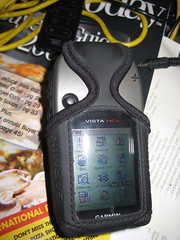
This is the third (and final) part of my reactions to my new Garmin Vista HCx model GPS. This installment is computer-related pieces.
Maps & MapSource
There’s not much reason to buy the Vista HCx model unless you’re going to use it with maps. There are two basic kinds of map products available: routing and… non-routing.
The non-routing maps are things such as topographical or marine maps, and work equally as well on lower models of the eTrex line. Routing maps, on the other hand, are capable of providing turn-by-turn driving directions in the same fashion as Garmin’s NUVI car-based line of GPSes.
I got two MapSource products so far, City Navigator North America and the the US Topo maps.
Garmin’s mapping product is MapSource. MapSource is a Windows-only program, which presents a problem to a Mac user, because certain maps, such as the City Navigator maps, require unlocking and key management to be loaded on the GPS. In this instance I’m fortunate because I’m condemned to have to have Windows around for work, so I have Parallels running on my Mac. I was able to install and use MapSource inside a virtual machine with an install of Windows XP.
This was not without certain problems, particularly concerning the installation of the USB driver for the GPS. There seem to be conflicting versions, and the damn thing, to this day, still asks me to install the driver every time I attach the GPS in Windows. That’s an inconvenience and, at this point, I’m willing to blame it on the virtual machine environment, although I’ve not encountered this with other USB devices.
Second, MapSource is a pretty awful program. It’s a classic example of software written in support of a hardware product. It’s not well-thought out and they’ve got a long way to go before this would cut muster as an OSX app. At present, to my knowledge, there is no way to use MapSource maps on your Vista GPS without having an available Windows computer. It is an option to purchase pre-loaded microSD cards with Mapsource products on them, but I’m unclear if you still have to go through a Windows activation program to use them.
I obtained and installed City Navigator first. Per instructions, I installed the Garmin USB drivers first, current from their website. Then I installed the City Navigator product. The maps and the software are part of a single install process, and there are no options for all or partial installation. After installation, I downloaded an update from the Garmin website.
Mapsource is somewhat like Google Earth, but without the satellite images. You can plot waypoints and routes, plus the City Navigator product comes with thousands of points of interest (“POIsâ€) locating schools, restaurants, banks, etc.
The North American map, which doesn’t seem to include Mexico, is broken into sections. Arizona, for example, is broken into 4 pieces. With the MapSource tools, you can select the maps that you want transferred onto your GPS. This is necessary to conserve space. Non-microSD versions of the Vista only have 24mb of space for storing maps and the ability to be selective is crucial.
The City Navigator product requires activation and is bound to the unique ID of your GPS and must be done with MapSource.
The Topo maps do not require and unlock key, but still must be loaded into MapSource to be loaded to the GPS.
When you install your second MapSource product, the installer acts as if it is doing a complete re-installation of the MapSource product, even though you are just adding additional maps. That’s an awkward system and not very logical.
For the time being, I’ve loaded the topo maps for all of Arizona, and the City Navigator maps for Arizona and all of the border states. The 2GB microSD card on my unit is still well below half utilized.
Garmin has slowly been releasing Mac-based utilities. For example, they have a GPS-firmware update utility that works fine with the Vista. A MacWorld they finally released a beta version of “Bobcatâ€, their OSX version of MapSource. You cannot install maps to your GPS with it, not can you install maps into Bobcat.
There’s an insane and deeply wasteful way that maps are installed. First, you load them in Windows MapSource. Unlock them, load them to your GPS. With US topo and City Navigator, this is around 4gb of disk space. You then run a windows program called MapConverter, which exports the 4gb maps to another 4gb file with a .gmapi extension. Then the program tar-zips that into a .tgz file.
You move the .tgz file onto your Mac. (In my case it was already there) and then (get this!) you unzip the .tgz file.
Then, there’s a Mac-based utility called MapInstall which takes the unzipped .gmapi file and moves it into your ~/Library/Application Support directories and tells Bobcat you’ve got it.
If you’re not being careful, you’ve now got 4 sets of the 4GB worth of files on your computer!
I’d like to say Bobcat is a good product, but so far, it turns my GPS off every time I try to load data to or from the unit, and then throws an error exception and dies. As a mapping program, it’s still very basic.
Having the maps on the GPS is a paradigm-shifting experience. It’s like having a completely different electronic gizmo. Prior to the maps, the unit was perfectly serviceable, but now I have dozens of new things to play with. I can search for and find addresses anywhere in the areas I have maps loaded for. It locates businesses by name, and even allows me to do searching for nearby places containing certain words in the name. (Example: Locate all nearby places with the word “pizza†in the name.) If I want to have xiao long bao at Din Tai Fung in California, I just key in their name and it pulls up driving directions and an ETA. (It’s a long way to drive for dumplings.)
When it is giving you driving directions, it usually provides plenty of advance warning about upcoming turns and lets you know which way you’ll be turning. Should you miss a turn,it obediently recalculates a new path.
The topo maps aren’t as useful, and they’re at large enough scale that they don’t have a lot of detail. They are helpful when you go off road, though.
Although they don’t seem to sell it in the United States, I know that Garmin also produces City Navigator and topo maps for Taiwan. I’m really looking forward to buying them and trying them out next time I’m in Taiwan.
With the patchy OSX support, it’s lucky that I don’t need the Garmin programs much, except to load the maps in the first place.
To make it work, it’s quite a hodgepodge, and I’m slowing really improving what I know by looking for help in the geocaching.com forums over at groundspeak.com.
Here are some of the utilities I use
Google Earth Plus
At $20 per year, the utility of Google Earth Plus is still in doubt. You do have access to dedicated servers, and you can connect your GPS directly into the program. You can transfer data directly from your GPS into Google Earth Plus, but not transfer data back to your GPS.When you connect the GPS to Google Earth Plus, you can receive real-time position updates, and even track your movements. Presumably, this is a lot more useful for people with laptops. While I was testing it, I was sitting at my desk, and the “real-time†display was pretty dull.
GPSbabel+
GPSBabel+ is a free graphical front-end for GPSBabel, a veritable Rosetta-stone for GPS formats. GPSBabel can convert from practically any format to any format. GPSBabel+ can also connect directly to your GPS and import and export data into any of the formats it understands.This is a top-notch little utility, and my only complaint is that Geocaching data files in .GPX format don’t seem to load into my GPS using it.
LoadMyTracks
LoadMyTracks is another free utility for loading and unloading data from your GPS. This one only understands GPX and KML files, but it feels slicker than GPSBabel+. It’s also faster and more responsive. Key feature for me is that LoadMyTracks correctly loads geocache data into my GPS from .GPX files.HoudahGeo
HoudahGeo is a program I only discovered today. It’s purpose is to synchronize the tracking data from your GPS with the date/time stamps in the EXIF data of digital photos.For example, if you’re out on a hike, you leave your GPS running. This records where you’ve, how fast you’re moving, how far you’ve gone, and other data like that. Let’s say you also take photos while you’re out hiking.
When you return to base, you take those photos into iPhoto (or Aperture). You can then select them directly in HoudahGeo. After selecting the photos, you can either import data directly from your GPS or you can import it from a .GPX file exported from the GPS. HoudahGeo syncs the two sets of time data and allows you to update the EXIF info in the photos (or copies.)
It also has tools for exporting directly to flickr or Google Earth.
This is a slick program, and since I’ve only had it a few hours, I haven’t given it a complete workout. Having the time in your camera synchronized with your GPS is critical, although you can enter an offset to compensate. I’ve had a couple problems, including the program crashing when I try to extract the data directly from the GPS and failing to maintain the orientation of auto-rotated pictures when exporting to Flickr or Google Earth. Other than that, this promises to be a fun program.
HoudahGeo is $39.
Conclusion
Mac support isn’t where it ought to be with this Garmin Product, but there are enough alternatives available to make for a lot of added value to this GPS. I’d like to see the map products freed from the shackles of Windows, plus a little more thought given to the Garmin programs, but otherwise, it’s working OK for me.Technorati Tags: GPS, Review, Technology
-
There’s crap, and then there’s crap!
In the United States, we have this thing called a Constitution, it’s supposed to be the highest law in the land. There’s a couple things in that Constitution, like the First Amendment, and Article VI, section 3, which are supposed to build a wall between the government and religion, and prevent any form of “religious test†as a qualification to any office or public trust in the US.
It’s all pretty straightforward and anyone with a cow’s brain or better ought to be able to understand it. That said, there’s either some cow brains in certain state governments or we’ve got people willfully contravening the US Constitution.
I found these examples a while back and a saved them, but failed to mark the attribution. Since I can’t quote the original source, I looked them all up just to see if there are really true. They are. unbelievable!
The Texas Constitution
Article 1, section 4No religious test shall ever be required as a qualification to any office, or public trust, in this State; nor shall any one be excluded from holding office on account of his religious sentiments, provided he acknowledge the existence of a Supreme Being.
(Emphasis mine.)
I guess I’m OK in Texas, I do acknowledge the existence of a supreme being – myself. It may be immodest, but, if that’s the best they’ve got in Texas, I’ve got them beat.
The Constitution of North Carolina
Article VI, Section 8 Disqualifications for OfficeThe following persons shall be disqualified for office:
First, any person who shall deny the being of Almighty God.
Great, atheist are first on the hit list in North Carolina, a charming state, I’m sure.
Incidentally, these are the “disqualifications†for holding an elected office. The second disqualification is not being eligible to vote and the third is treason or a felony.
I’m so they were able to get their priorities straight.
Let’s move down to South Carolina, an apparently equally benighted place, with their constitution, Article VI, Section 2, charmingly titled, “Person denying existence of Supreme Being shall not hold any office under their Constitution†Which says, in its entirety,
Like Texas, I think I have an “out†on this one, since it only mentions “supreme being.â€
Then there’s Tennessee, the land that gave us the Scopes Monkey trials. A state that can’t even publish their constitution in something other than PDF.
They’ve got Article IX, Section 2 under disqualifications from office:
Despite this nonsense, I’ll give minor points to Tennessee for also disqualifying all ministers and priests from being an elected legislator. They’ve also had the good sense to disqualify anyone how has ever participated in a duel.
So… why haven’t these constitutions been declared unconstitutional?
Technorati Tags: Atheism, Commentary, Rant, Religion
-
Primeval – Series 2 – Episode 2 – Review
Hasn’t Cutter read or seen any single alternate timeline story in his life?!
(more…) -
One Chicken to Rule Them All

My wife told me earlier today that she thinks I like to write. After all these years of marriage, I was shocked that she didn’t understand me at all.
I hate to write.
I’ve hated writing all my life and yet here I am, writing again.
For the most part, I write what I write because if I don’t, it won’t get said – or, at least, it won’t get said in the right way.
If you look at my writing with that thought in your mind, you’ll see why so much of my writing is (I’m told) somewhat acerbic. There are things that need to be ridiculed, at every opportunity, like Creationists, because they get too much credibility or too much deference when they should be laughed out of the room.
Chinese nationalism is like that, too. Check out this blog post from Laowisewass
* , which, I kid you not, points out that a good reason to “unify†Taiwan is so that China won’t look like a legless chicken on the map. Admit it, you sit around laughing at China, the legless chicken, at least once a day, right?(If there’s a comment there about Col. Sanders, that was me.)
This idea makes complete sense to me. I know that’s the first thing I do when I look at a map, I try to make pictures of animals out of the countries. Is it any wonder that the island of New Guinea is such a mess? I mean, obviously, it’s a kangaroo, and Papua New Guinea is its ass. Their destiny was sealed by geology!
* It’s not often that I’ll wax enthusiastic about someone’s internet screen name, but “Laowiseass†is a fantastic name. “Lao Wai†(Pronounced: “lao whyâ€) is a somewhat uncomplimentary name for a foreigner. Laowiseass, is just hilarious.
Technorati Tags: Chinese, Commentary, Taiwan
-
My GPS – Garmin Vista HCx – Review
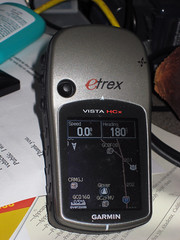
This article of a three-part series. Part One detailed my history with GPS units over the last 12 years.
This part picks up with my selection criteria and impressions of the Garmin Vista HCx GPS.
Being a computer-oriented person, my first “requirement†in a GPS was convenient data access to a computer. That was true years ago when the process was rudimentary, and it is even more true in this age of Google Earth and travel routing GPS systems.
My list of requirements:
- Data connection (USB preferable)
- Mac compatibility (at least connect-ability with Google Earth)
- Map support (Topo and street maps)
- Handheld
After much research, I zeroed in on the Garmin eTrex Vista HCx model. Garmin makes several lines of GPS, but I opted to stay with the eTrex models based on familiarity and, among the different lines, the available options are generally the same, with a few exceptions. Within the eTrex line there is a plethora of models these days, ranging down to the basic model that my dad has to the high-end Vista HCx.
Since I got it, three weeks ago, I’ve also purchased a number of “accessoriesâ€, including mounting hardware, data card, maps, etc. I’ll try to address them in the next article.
Accuracy
It would be hard to argue otherwise that a GPS’s utility lives and dies by its accuracy. So far, this unit’s accuracy has been exemplary. We can try to shoehorn in Heisenberg’s Principal of Uncertainty and argue in a somewhat roundabout way that I can’t be certain about the accuracy because I’ve can’t be certain of the accuracy of the original measurement of the point I’m trying to compare measurement to.
In short, how do I know for sure that the GPS is leading me to the actual spot I told it to?
The best I can do is try to assess how I’ll use the GPS, and go from there. How will I use the GPS? Largely with Google Earth, so the accuracy has to tally with Google Earth.
I’ve taken several clearly identifiable points in the Google Earth satellite imagery, such as the basketball goal in my father’s backyard and marked the waypoints. I’ve transferred that waypoint to the GPS and navigated to the waypoint. Under those conditions, the accuracy has been consistently approximately 10 feet. (Garmin literature indicates 9′ accuracy with error-correction turned on. My tests indicate there’s no reason to dispute that.)
My second series of tests involved going to areas with a visible landmark, such as an isolated tree in a park, and snapping a waypoint using the GPS. I then transferred that waypoint into Google Earth and compared the placement with the actual landmark. Again, the point is almost always off by approximately 10′.
Note, I said “off†by 10′, not “within†10′. In every test, the waypoint has missed the landmark by 8-10′ as measured by Google Earth’s measuring tool.
The third way I tested it was to snap a waypoint at a known landmark, then, on another day, attempt to return to it.
I wasn’t sure what to expect with this test. Would the inherent error is the taking and the reading of the measurements cause the error to compound each other? Cancel each other out? or both? Answer: Both. The error factor was a lot more variable, and stretched, on one occasion, to nearly 20 feet. Generally the error was in the 5-15′ range.
That indicates to me that the error factor of a GPS has to do with time-dependent factors, rather than the algorithms used to compute location. If it were the algorithms, I would except finding this particular type of waypoint would be the most accurate, since the algorithm would “re-create†the same error at the same location.
Summary of accuracy: I’m completely satisfied that the unit consistently works to the manufacturers specifications.
Reception
So far, I’ve had extremely fast acquisition of satellites, outdoors and in. The only exception is at my office, which the 4-storey metal-framed building blocks practically ever kind of signal.
Operation & Controls
The eTrex Vista models evolved from the earlier eTrex model, which is what my father owns. The eTrex was originally designed for left-handed operation. The literature said that this was so that your right hand was free for carrying walking sticks or whatever. We’re both right-handers, and almost never use the eTrex in the left hand.
The Vista, on the other hand, although I didn’t notice any explicit mention of it in the manual (such as it was) follows the left-handed convention, although the buttons are different from the eTrex because of the more complicated menuing system. The unit can still be operated in the right hand, but the additional thumb control on the front is clearly positioned for the left-hand thumb. Access from the right hand requires your thumb to cross the screen, or shifting the GPS to an awkward position.
This has been giving me a little trouble since I’m used to holding the eTrex in my right hand and prefer it that way under most conditions.
Apart from the thumb control on on the front, the other controls are on the side of the unit, keeping your fingers away from the screen.
The top two controls on the left work the zoom, up and down. Below them is a “menu†button, which serves roughly three functions. First, press it once on any screen, and the menu for that screen pops up. Press the button twice (or press it again when in a screen menu) and the system main menu screen is brought up, which may save you a long trip through the screens. Finally, press and hold the button, and you are taken directly to the “find†screen.
On the right side, the top button is the “page†button, and also the cancel that dismisses menus or other dialogs. This button, when held in for a while also turns on and off the electronic compass.
The lower button on the right is the power button and also the button for activating the backlight.
On the front is the thumb control, which navigated through menus and when pressed, is the “Enter†key. I have the most problems with the thumb control. It navigates fine, but the Enter press has to be straight down. If you press at any angle, it seems to cancel what you’re doing. Big, clumsy thumbs need not apply.
Menus/screens
The eTrex Vista HCx is operated via a series of screens, such as the main menu, the compass, the map screen, etc. You cycle through them using the page button. The screens that you see, and the order they appear in are configurable. If you have too many screens, it can become a chore to “cycle around†to the screens you normally use. From the main menu, you can choose to go directly to any screen that you don’t have in rotation. If you do have that screen configured to be in the rotation of pages, it doesn’t appear on the main menu anymore. I think this is a flaw.
When you manually select a screen from the menu, if you then hit the page key to see another commonly-used screen, you can’t get back to the first screen without going back to the main menu and selecting it from there again. I haven’t (yet) come to the right customization of screens so that I don’t feel inconvenienced from time to time. Still, it does have a lot of available screens, many of which I never care to see, such as the one for timing a high-altitude parachute jump.
Briefly, I’ll touch on several of the screens that I use most commonly.
The Main Menu – Always available. Lists all the functions you don’t have configured to be screens. Setup and Find are also on this menu.
Compass – The compass is, not too surprisingly, a graphic representation of a compass. The compass heading is derived principally from the navigation data as you move. When you stop, GPS compasses become confused. the Vista HCx model includes and electronic compass for use in these times. Because it drains power, the compass doesn’t activate until you’ve been motionless for a certain period of time. You can also deactivate it completely if you don’t want to come on when you stop moving. If you’re navigating to a point, the compass also has a pointer to show which way you should be going.
There are also some data displayed on the compass screen, which I’ll get to when I discuss the Trip Computer
Trip Computer – The Trip Computer is basically the “Geek screen.†It’s a data read-out display of 8 different facets of your navigation. You get to choose which ones from a long list. Some examples of the types of data: elevation, speed, course, odometer, distance to next destination, distance to final destination, current ETA as destination, and a whole raft of others. These fields are configurable, and you can also switch to a “big numbers†mode for people with difficulty reading the small screen. You only get three data fields in big numbers mode.
The ability to pick and choose you data displays is also available on other screens, such as the Compass, the Highway display and the Map. On those screens, you have fewer available data fields, but you have the same selection pool to choose from. I like this customization, and I’m still experimenting with the “best mix.†I tend to like different information depending on how I’m navigating and, like the choice of screens, I haven’t quite found what works best for me yet.
Map – The map represents a top-down view of where you are, relative to other waypoints and map points in the system. It also shows a breadcrumb trail of where you’ve been, and a course line to where you’re going.Out of the box, the Vista HCx only has a North American base map which includes major highways and interstates, plus some rough waypoints for locating major cities. This unit is compatible with Garmin’s MapSource products, but in the interest of keeping this review a bit shorter, I’ll save reviewing the GPS w/maps for a later post.
Extra Features
The various lines of Garmin GPSes have a variety of different “levelsâ€, for example, the “H†in HCx is for High-Sensitivity, which means it is a WAAS-enabled unit. (WAAS is a air navigation aid designed to augment GPS accuracy), The “C†is for Color screen, and the “x†designates that the unit accepts MicroSD data cards.
The eTrex line, in addition to the basic and the Vista models, also includes the Summit, the Legend and the Venture. It’s not important to differentiate them here, but the features that differentiate the Vista models are the electronic compass and the barometric altimeter. Without those features, the eTrex Legend is virtually identical, with a list cost of over $50 less.
Both the altimeter and the compass work, but need calibration, particularly the altimeter which is subject to changes in air pressure associated with storm fronts. GPS-calculated altitudes are notoriously inaccurate, and if you want accurate altitude info, the extra cost for the altimeter may be justified. However, if you load topographical maps into the GPS, the waypoint marking process will use the more accurate data from the MAP to set the altitude. (Or so I’m told.) This might be an alternative for some people rather than the altimeter option.
Data Interface
Unlike many older Garmin units (and even some current ones), the Vista models use a USB interface, rather than a proprietary serial cable. Not only does that make it easier to connect to modern computers, but USB supplies power to the GPS, conserving battery life.To get the data to and from your computer, you need software, and since I’m exclusively a Mac user, that can present problems since it’s still standard practice for device manufacturers to concentrate on Windows users first, if not exclusively.
Garmin is at least working on OSX compatibility, and they provide several downloadable OSX-based utilities, such as a firmware updater and map and Point of Interest loaders. Also, there’s a web-based waypoint loader, used at places like geocaching.com or motionbased.com that allow you to interact with web sites and up and download waypoints. I’ve used both the firmware updater and the online transfer utilities and both worked flawlessly.
What I really need is import and export from Google Earth. For $20 you can upgrade to Google Earth Plus, which lets you connect your GPS to Google Earth, for importing and real-time tracking of your position, but it doesn’t support plotting waypoints in Google Earth and sending them to your GPS. That makes it next to worthless for planning any kind of excursion.
What I found was a program called GPSBabel+ which not only converts to and from most GPS-like formats, but can import/export directly to/from the Garmin GPS.
With these free resources, the Vista HCx works well with a Mac, save for using maps, which is awkward and requires some expensive “extra†software. Which I’ll describe in the MapSource post.
Misc
When my dad got his first Garmin GPS, it included a big manual, and even a video on using the GPS. When he got his eTrex, it at least included a helpful manual. The manual for the Vista HCx really assumes you already know all you need to know about GPSes, and does a poor job of explaining the functions. The Garmin website FAQs and such are also nearly useless.
I hope this isn’t intentional to drive sales of training videos or books. They really need to improve their documentation.
The color screen is a bit difficult to read in daylight, and I find myself turning on the backlight even during the day, which ought to be unnecessary.
Conclusion
The Vista HCx is an impressive all-around, hand-held GPS.

“Garmin eTrex Vista HCx Color High-Sensitivity Mapping Handheld GPS†(Garmin)Technorati Tags: GPS, Review, Technology
-
Go get ’em, Senator Grassley!
You might think, looking at my past writings, that I am unilaterally opposed to religion and therefore don’t support freedom of religion.
This is simply not true. I support freedom of religion, but what I support even more is freedom from religion, which I think must be integral concepts. When those two come in conflict, freedom from religion is more critical, because that is the ultimate form of religious freedom.
That’s not really what this post is about, save that, one of the areas that yanks my chain is the tax-exemption granted to churches. It’s perfectly acceptable to give all your money and possessions to a church and go live in a cardboard box, for all I care, but I, as the taxpayer, shouldn’t be footing the tax burden. I am not free from religion because of this travesty of law.
Churches have had a free ride in this country for far, far too long.
Supporting errant nonsense like this is bad enough, but what’s worse is the even slimier scumbags who have combined a massively gullible audience and church tax advantages to make themselves fabulously wealthy and avoiding proper accountability and taxation. This abuse has been obvious for years, and the perpetrators don’t even bother to try to hide it.
They drive around in $350,000 Bentleys (which are really owned by the ministry, and therefore tax-exempt) and live in multi-million dollar homes (that are really just church properties, and therefore tax-exempt) or take luxury vacations at exotic spots (while doing so-called “missionary workâ€, so their expenses are paid for by their church, and therefore tax-exempt.) It’s completely and utterly wrong.
Worse, this has been going on for years, and it has been completely ignored by the authorities. They don’t want to step on toes who will shout, “You’re repressing my church! That’s a violation of our rights of freedom of religion!!!!!†In the past, that’s been enough, and so people like me are shouldered with a higher tax burden.
Without the exemptions, you can look at it one of two ways, my taxes would be less (and I wouldn’t be forced to support religion), or there would be more available tax revenue to pay for public services (which benefit people regardless of their religion.) Either way, the churches get a free ride at my expense.
Well, the hopeful news is, from a story on Alternet, Senator Grassley, R-Iowa, has noticed these slimy buggers, and has turned the Senate’s attention towards them.
To give a couple examples from the article
Benny Hinn, a TV preacher who runs the World Healing Center Church in Grapevine, Texas. Hinn, who travels the globe conducting faith-healing revivals, lives in a seven-bathroom, eight-bedroom mansion overlooking the Pacific Ocean valued at $10 million. It is claimed as a parsonage.
Joyce Meyer Ministries in Fenton, Mo. Grassley asks Meyer and her husband David to explain expenditures like a $23,000 commode with a marble top, a $30,000 conference table, an $11,000 French clock and a $19,000 pair of vases for the ministry headquarters.
The money quote has to be from “Bishop†Eddie Long, “I pastor a multimillion dollar congregation. You’ve got to put me on a different scale than the little black preacher sitting over there that’s supposed to be just getting by because the people are suffering.†It’s unclear to me, but I think he might have been quoting Jesus when he said that.
Before yesterday, I’d never heard of Alternet, so I did some further checking, and found at least one article confirming this on ABC News, so I think it’s a real story. The disturbing, but not surprising, development is that some are refusing to cooperate sighting violations of religious freedom.
The disturbing part is, what they’re doing is so disgusting unethical as to be unconscionable, but it’s probably not illegal.
We can hope that Sen. Grassley’s inquiries will ultimately lead to a revocation of the tax-exempt status for all churches, or at the very least, accountability to the tax-payers with at least the same level of oversight as other “charitable†organizations.
Technorati Tags: Commentary, Rant, Religion
-
I like butter
Yes, I know. That title could be seriously taken out of context, and yes, I was scarred mentally by seeing Last Tango in Paris in High School, but in this case, I mean that statement as 100% literal. This is a blog post about butter. It might be my most trivial post ever – and it’s got lots of competition for that title.
Butter is nature’s perfect cooking material, it adds flavor from everything from a bacon sandwich to french onion soup… and don’t even try making a butterscotch pie with margarine!
I may love butter, but I’ve taken butter for granted until recently. Less than a year ago, Costco started carrying Kerrygold cheeses from Ireland. They’ve got a couple of subtle but tasty cheeses, especially Dubliner and Blarney Castle. I’m partial to them, and the kids can eat them by the block… which is good because I’d much prefer them to learn to enjoy “real†cheeses rather than processed American cheese.
One day, Costco had Kerrygold Butter, so on a lark I purchased some. It was very good, obviously made from happy cows munching all that green grass in Ireland. I did comparison taste tests between the Irish butter and the standard Costco butter. What I noticed was that the butter tasted basically the same, but without a certain harsh, almost chemical edge. It tasted higher more natural. Since then, we usually use the Irish butter for instances where the buttery flavor needs to shine, but I keep plenty of the “cheap stuff†on hand for cooking bacon and such.
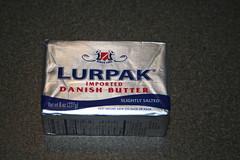
So I mentioned we went to Fresh & Easy the other day, didn’t I? Yes. I’m sure I did. Most of their merchandise is Fresh & Easy branded, but, I was surprised that they carried the Irish butter and more. They also had Lurpak Danish butter and Butter of Parma, Italian butter. We were really well-stocked on butter, but I picked up the Danish butter just to give it a try.
When I got home and I tasted the butter, there was an instant sense of Deja Vu. I was overwhelmingly reminded of Taiwan. As best as I can tell, butter isn’t a natural part of the Taiwanese diet, and their butter all seems to be imported from dairy countries, like Australia and New Zealand. My in-laws purchase Australian butter in a radio-stabalized tin which reminds me more of petroleum hand cleaners used in auto garages than a dairy products. The stuff is awful.
But if you go to a bakery and buy any rolls, breads or garlic breads there’s a unique flavor that I could never really pin down. When you fly on the plane, they give you a roll and a pat of New Zealand butter. It has the same flavor. It’s good, but the taste is unique and one I’ve never tasted in the States.
Until now. The Danish butter is it. I have no idea what the reason is, but we know how the correct butter for attempting to make the various bakery breads from Taiwan.

So, this weekend we went back to try the Italian butter. Now I’m on a world butter tour. Who knows what other great butter flavors I might find?
It’s not the Italian butter. It’s a bit like eating lard. Irene couldn’t even swallow a bite. It cooked up OK for sauteing onions, but I wouldn’t put it on toast.
Why the differences, though?
Technorati Tags: Food
-
Another day, another geocache
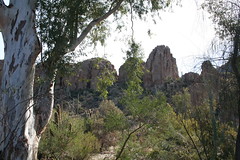
With the weather bordering on the phenomenal, we decided to get out of Phoenix for a day trip up to the Boyce-Thompson Arboretum, some thirty of so miles outside of the Phoenix metro area (depending on where you start measuring.)
Although I’m not particularly interested in botany, I’ve always liked the arboretum. It’s set in a stunning desert environment, along Queen Creek, and is an idyllic place to spend an afternoon. There is even a small picnic area on the grounds so you can take lunch and make a day of it.
On our last trip, before James was born, the statewide drought had rendered Queen Creek completely dry. Although the drought isn’t over, the recent rain and snowfall have the creek running again, and that just adds to garden ambiance of the arboretum.
After we were done at the arboretum, but while were in the area around the town of Superior, we decided to see if you could find any geocaches in the area. Superior is at the base of a cliff known as Apache Leap and above that a plateau known as Oak Flat. Many of the geocaches in the area require getting impractically close to the cliffs (if not actually scaling down them.) With the kids, we tried to identify one or two that would be “easy†to get to. I was only somewhat successful at my choices.
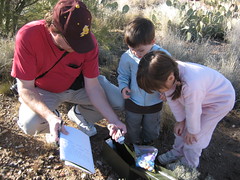
The first cache was easy to find. Located on level ground, not far from an access road, the GPS brought us right to it. This was a “traditional†cache, stored inside an ammo box and it was filled with toys, which delighted the kids no end. We swapped out one of their toys for something in the box, signed the log book and put the cache back in place.
Jazzed on our success, we headed for the next one. I knew we were in trouble when we pulled up. I knew it was on a pullout as you approach the top of Oak Flat along the Queen Creek canyon, but I (wishfully, perhaps) though it would be on the road side, not the opposite side of the creek. The canyon isn’t very deep at that point, but it was too rough for the kids. I proceeded on my own, first climbing down one side, then crossing and beginning to climb up the other side.
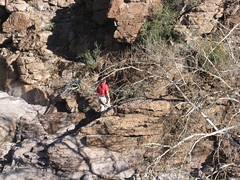
The clue indicates that the cache, which is the size of a film can, is located in a rocky crag. The problem is: that’s like placing the cache in a forest and saying it’s “in or near a tree.†Everywhere you look is a rocky crag along the canyon wall. I dug around looking at crag after crag, cautiously checking them for animals, but eventually had to give up. The kids, sitting in the parking lot, had gotten tired, and since the parking lot was busy and the highway next to it was bustling with high-speed traffic, I gave up and returned.
Someday, I shall return to find this one.