Category: General

  • A Time to Feel Small and a Time to Feel Special

    In this galaxy, there’s a mathematical probability of three million Earth-type planets. And in all of the universe, three million million galaxies like this. And in all of that and perhaps more, only one of each of us. Don’t destroy the one named Kirk.

    – Dr. Leonard “Bones” McCoy

    Ol’ Doc McCoy may or may not have gotten his numbers wrong, but what he said ranks upon one of the most important thoughts ever spoken.

    I was reminded of that quote earlier because I was doing some work on Fusion Patrol. I’ve been preparing a video with an interview with Ben and me and, because it was Fusion Patrol related, I tossed the most recent Fusion Patrol opening titles that I had onto the beginning of it.

    What became immediately obvious was that the old, vintage credits, rendered in Adobe After Effects, were of a grossly lower video resolution than the footage being produced even by our iPhones, and so I set upon a project to develop an updated version at HD resolutions.

    My first thought was to simply recreate the originals based on a new screen resolution, but I remembered that the old credits had been designed specifically for online videos – back in the day when bandwidth was slow and video codecs were considerably more inefficient. I had intentionally made the old credits simple to reduce artifacting and bandwidth usage.

    I decided I would return to the constant theme that appeared in all the “TV” credits for Fusion Patrol: astronomical pictures from NASA.

    I chose to use the single most incredible photographic image ever captured by mankind – the Hubble Ultra Deep Field [HUDF] image. Have you seen it?

    The Hubble telescope looked at a tiny patch of sky. Image holding a piece of paper, 1mm square at your arm’s length. That’s how small of a piece of the sky the image is of, and it was chosen because there was nothing there. It’s a picture of the darkness that lies beyond our galaxy… and what did they find?

    This:

    Hubble Ultra Deep Field

    Look at this picture for a while and marvel and the most amazing thing you’re ever likely to see. Click on it to see it much bigger. I can stare at this picture for hours and marvel at it.

    On a very dark night, with the unaided eye, they say you can only see about 2,000 stars; 8,000 if you could every star visible from Earth (which you can’t because the Earth is in the way of some of them) but that’s not true when you get above the Earth’s atmosphere. That’s why we have the Hubble space telescope.

    While you’re standing outside, if you stuck a little 1mm square of paper on thumbnail and then stretched out your arm in front of you, you’d be looking at approximately the amount of the sky being pictured in this photo – and it was chosen by the Hubble scientists because it is an empty patch of sky.

    Look at that picture again. Virtually everything you see is a galaxy. 10,000 of them! You are staring through a tiny hole in the light pollution of the stars of the Milky Way galaxy into the abyss of the universe beyond. The farthest away are approximately 13 billion light years away.

    This is the third time Hubble (and the most detailed) time Hubble has conducted this experiment in different locations, and each time is the same. The even distribution of matter throughout the universe is part of our understanding of the Big Bang, hard through it is to conceptualize unless you grasp that space/time itself is expanding rather than just the matter within.

    Our galaxy has an estimated 200-400 billion stars, and you’re looking at 10,000 more galaxies. The estimate, based on these pictures, is that there must be between 100-200 billion galaxies.

    In the face of it, we are unimaginably insignificant.

    …and yet “…in all of that, and perhaps more, only one of each of us.” We are also incredibly unique.

    “Don’t destroy the one named [insert your name here.]”

  • Flip Mino HD vs Kodak Zi8 and Apple iPad, iPhoto and iMovie

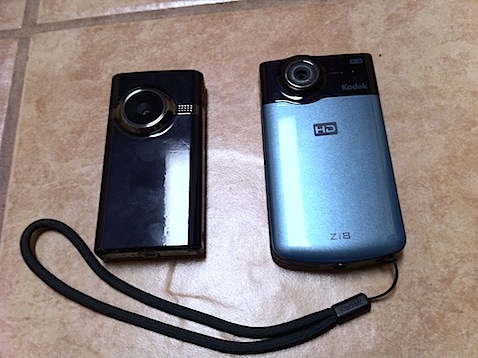
    Recently in conversation, the topic of using the Flip HD and the Kodak Zi8 mini-camcorders came up, and specifically, how well do they work with Apple products, like iMovie. As it happens, I own both the Flip and the Kodak camera, so I put down a few thoughts on them. For anyone who might find this comparison helpful, here then in a slightly edited and revised version of those thoughts.

    Comparison Flip Mino HD and Kodak Zi8

    I’ll start by saying that, as a camera, I prefer the Zi8 in virtually every way to the Flip HD with the exception of the shape of the bottom of its case, which is, I admit, a rather trivial – but valid – complaint.

    As far as I can see, picture quality, macro ability, picture format options (30 or 60 fps, for example), SDHC card compatibility, spare battery capable, low-light ability… in every way, the Zi8 surpasses the Flip. It’s my “go to” HD camera – although I use my iPhone 4 often because it is always with me; however, as a camera, the iPhone 4 is still pretty limited.

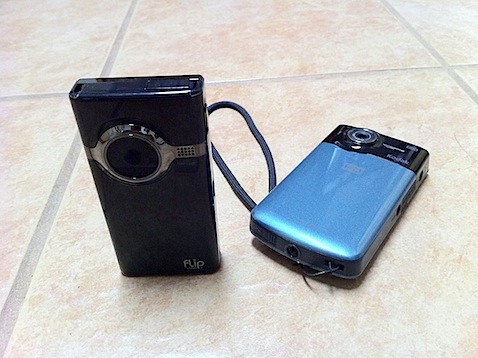
    My complaint about the “bottom” of the Zi8 is simply this: It’s rounded. Both have tripod sockets, but with the Flip, the flat bottom means you can, in a pinch, stand the camera on a table. The Zi8’s round bottom makes that virtually impossible, making a tripod mount absolutely necessary.

    So, as a camera, the Zi8 is my preference, but if the question is: Which camera works best with a Mac (or, perhaps I should say, “Apple products” then I’d have to say that the Flip is somewhat more compatible.

    One falls over, the other doesn't

    iPad

    First, let’s look how it works with the iPad.

    I’m starting with the iPad because it is probably the most inflexible environment to use the camera with and supports a narrow range of formats as opposed to the Mac.

    If you want to use a camera of any kind with the iPad, you must have the iPad Camera Connection Kit, which is a pair of dongles for the iPad. One is a USB dongle, which allows you to connect a standard USB cable to the iPad and then connect that to a camera, just as you might connect your camera to your computer. The other is an SD card reader, for plugging SD cards directly into your iPad. (These dongles can only be used to get stuff onto your iPad, not back off of it.)

    Both the Flip and the Zi8 have built-in USB connectors so that they may be plugged into a computer without having to carry a cable. This is a great feature, but a little awkward depending on what other USB devices you have and the configuration of your computer. The Zi8’s is flexible and allows slightly greater freedom in connecting the camera to a computer. The Flip’s is fixed and I always have to disconnect all other USB devices from my MacBook Pro before I connect it. You could, of course, use an extension cable, but that defeats the purpose of having the connector built-in.

    Using the camera connection kit USB Connector the Flip connects and the videos can be imported directly into the iPad. Under the same circumstances, the Zi8 causes the iPad to complain that it needs “too much current” and it will not recognize the device. Score one point for the Flip.

    Using the camera connection kit SD Card Connector the Flip cannot connect because it doesn’t use SD cards. The Zi8’s cards are easily read and imported. Score one for the Zi8.

    I’m going to make a note here that under each camera’s appropriate connection method, you can see thumbnails of the videos. That’s good because you sometimes don’t want to import every picture or video and you need to see a thumbnail to decide which ones to import.

    However, once the videos have been imported into the iPad… you can no longer see the Zi8’s thumbnails… you get a generic icon that says “movie”. The Flip ones have thumbnails and can be watched on the iPad. You cannot see a thumbnail or play the Zi8 video on the iPad. That’s 2 points (thumbnail and playable video) for the Flip and non for the Zi8.

    So, if you’re using the Flip with the iPad exclusively, I’d clearly recommend the Flip as the superior camera in terms of usability with the computer equipment. This is especially likely to be important if Apple ever releases iMovie for the iPad. Flip videos may be immediately editable. Zi8 videos almost certainly will not.

    The Mac and iMovie

    Let’s ignore everything I said about the iPad now and concentrate solely on the Mac. In this instances, I am referring to the iLife ’11 series of software. I was using them on older versions, but I’ll confine my remarks solely to the current version.

    If you plug either camera in, iPhoto sees them as cameras and will import and play the videos. No problem and this is how I use both cameras, importing the videos directly into iPhoto ands then using them in iMovie from within iPhoto. They both work fine.

    The Flip comes with some nasty video management software which is, at least, fully Mac compatible. I don’t like this software, but it does work. It is not necessary and can be ignored. On the other hand, this software also does the firmware updates to the Flip, so ignore it at your peril. There have been several updates since I bought the Flip. I do like the fact that the Flip has a planned mechanism for updating their firmware.

    The Zi8 has none of that, and, as far as I can tell, no firmware updates since I bought it, nor does there seem to be a user-friendly way to do the updates when they do happen.

    However, iMovie also has the capability to import directly from the camera, selecting only the clips you need, if you prefer to work that way. iMovie recognizes the Flip as a camera, it does not recognize the Zi8 as a camera. You have to get your Zi8 videos in from iPhoto or direct file import. Score one for Flip.

    Otherwise, all things are about equal.

    Conclusion

    So… if I and my iPad were on the road without computer, and I need to view my videos, the Flip would be the better way to go.

    On the Mac, since I use iPhoto to organize my videos anyway, this isn’t an issue and I use the same workflow for both cameras, therefore I prefer the better and more flexible Zi8 as a camera.

  • Some thoughts on the magic of the Magic Kingdom


    There’s a scene in the movie Nation Lampoon’s Vacation that I never saw coming. After fighting their way across the United States, through horrible tragedies, dead grandmothers & dogs, the Griswold family station wagon barrels into the completely empty parking lot of Wally World – a thinly disguised DisneyLand – only to discover the park was closed for maintenance.

    At that moment, I sat transfixed. Someone else had been there, too. Someone else had felt the crushing defeat just as I had when I was nine years old in 1974. Unlike the Griswolds, my father and I barreled into the massive parking lot, not in a station wagon, but a vintage Porsche 356B, but just like them, the lot (which is now Disney’s California Adventure) was eerily empty. Back in those days, DisneyLand was closed one day a week, and no doubt many a well-meaning father delivered their excited children unto the doorstep of disappointment.

    That has, perhaps, colored forever my perception of DisneyLand.

    We went back in 1977, and, while I remember having fun, it wasn’t so much so that I’ve had any reason to go back until 2010.

    And so now we’re here with our children and I’m having fun. It’s hard not to have when so many people around you, and especially your own children, are having a blast. Fun is infectious.

    The analytical part of me is dissecting each ride, marveling that what was cutting edge 1955 technology is still very much in evidence and musing as to why the rides are supposed to be fun, but I must acknowledge that they are fun.

    I am, perhaps, too jaded (or cynical, as some have said) to completely switch off Mr. Analytical and enjoy myself unreservedly as a kid might, but I can nonetheless enjoy it in my own way, and I can enjoy, and even empathize, seeing that unreservedly joy in my kids’ eyes, laughs and smiles.

    Location:W Convention Way,Anaheim,United States

  • Fusion Patrol Follow-up

    It’s a long overdue update to my previous blog post about the tribulations of getting the audio right on the Fusion Patrol Podcast.

    As last you may recall, I was testing Wiretap Anywhere from Ambrosia Software. Initial tests went very well and I subsequently purchased the software.

    We’ve done several podcasts since then under a variety of conditions: our standard two-person editions and a couple three-person versions, once at three remote locations and another with two people being “in the studio” at my house and one at a remote location.

    The results, to my ears, are outstanding. The quality of the audio (if not the actual content) is, I feel, on par or ahead of with the vast majority of amateur podcasts out there. We still have an issue in that Skype merges multiple remote sources into one, and I don’t know any way around that; however, Skype also seems to equalize them well enough that it isn’t too much of a problem.

    In putting together our two-in-the-studio episode we did get some cross-over between the mics, which resulted in some echo problems, most of which I was able to remove in post-production.

    Now I think it is time to move on to the next goal: increasing our audience size.

    I’m not going to give numbers, but I’m frankly amazed at how many people do actually listen. It’s far more than could be accounted for than by “just my friends” but, at the same time, you couldn’t keep a radio program on the air with an audience of this size either.

  • FaceTime for Mac Stays Resident

    Forget all the iLife ’11, OSX 10.7 Lion and MacBook Air at the Apple Event today, the really fun announcement was FaceTime for Mac.

    I’ve been playing with it all afternoon, and there are a couple interesting things about it that aren’t immediately obvious.

    For starters, video quality is good (with a caveat), both from Mac to Mac and from Mac to iPhone. Initially, video quality was poorer on one end of the conversation, but through testing, we determined that the MacBook’s built-in iSight camera (now FaceTime camera) did considerably worse under low-light conditions; however, this was not a FaceTime issue, as we got the same result from iChat also.

    The FaceTime program itself is basic, and does nothing more than make or receive calls from your address book (with a caveat). When you first install the program, you register with your Apple ID, identify the email address you want associated with your Mac and you’re done. It’s that simple.

    So here are the interesting things I’ve learned.

    • You can place FaceTime calls directly from Safari, using the URL format of “facetime://email@address.com” or “facetime://phonenumber”
      • This works on both Safari on the Mac and Safari on the iPhone 4.
      • Using this technique, you can bypass the need for someone to be in your address book.
    • FaceTime, once installed, “stays resident” on your Mac. It appears to load a hook at boot time and your Mac and it will respond to incoming calls even when FaceTime isn’t open
      • I wonder, though, how it will respond when I take my Mac to another wifi network? Is it beaconing my address on a regular basis? What information is it sending?

    While there are some issues concerning how FaceTime is being maintained constantly diligent, I think this will make a big difference in people making video calls. One of my main complaints about FaceTime is that you don’t know, when you call someone, if they’re not answering, of it they’re not on a WiFi network. Similarly, if the Mac required that you have FaceTime open, callers would likely have to call first to see if you were ready to take a FaceTime call, which really defeats the purpose of the whole thing.

    I do think this explains why FaceTime wasn’t built into iChat.

  • Bond in Retrospect

    There’s been some back and forth going on lately about what makes a great Bond film. (For those who don’t think Bond films are great, this post is not for you.)

    I’ve been a Bond fan since 1979, when I saw my first Bond film on the big screen. It was, of course, Moonraker and at the very moment Bond was tossed out of an airplane without a parachute, I was hooked. It was totally unexpected and, as the James Bond theme music washed over the theatre and 007 kicked back his armed and swooped down on the unsuspecting pilot like a giant raptor, the crowd, and myself, quite literally cheered.

    It was that moment, for me, that taught me about the “magic” of movies, sitting in that audience, whilst people gasped and then held their breath, then roared with thunderous triumph. The hair was standing up on the back of my neck.

    Sure, Star Wars was cool, but it didn’t reach out of the screen and grab you. Moonraker was a roller coaster – an absurd, ridiculous roller coaster, but a really fun ride.

    How could I not love this film, flawed though it may ultimately be?

    Perhaps it’s just age? I saw Moonraker at age 14, and I never missed another Bond opening until Pierce Brosnan took over in 1995 – and I loved them all.

    I saw Goldeneye with a date on my 31st birthday (It was still opening week, but it was the first time I’d missed opening day.) We walked out of the theatre in silence and turned to each other and said, “What was that?” It had all the Bond elements, and yet, somehow, it just wasn’t a Bond film. It was like one of those 1960’s “other” spy films trying to capitalize on James Bond – a pale comparison, but no the real thing, It seemed the producers had lost their touch – and yet, other people were walking out of the theatre raving about the film. “That was the best Bond film I’ve ever seen!” one woman exclaimed.

    (I rather impolitely quipped, a little too loudly, “Don’t like Bond films, do you?” To my chagrin, she heard me. Oops.)

    Honestly, though, that’s not what this post is about, that’s just the prologue.

    So, I was having this Twitter discussion at lunch today with correspondents far and wide and was marveling at how disparate our opinions on Bond films were – despite all being fans of the series. I realized that no amount of discussion was going to bring them around to the correct way of thinking, so I did what was within my own power – I became introspective.

    I tried to decide exactly what makes a good Bond film to me. First I tried to look at the elements that make a Bond film – Bond himself, hot babes, action, more hot babes, larger-than-life villains, larger-than-life (If you know what I mean) hot babes, cool gadgets, hot babes, daring stunts, hot babes, and, to a lesser degree, trivial things like plot and characterization.

    I didn’t really reach a definitive conclusion, but I did decide that it wasn’t the hot babes. I’m apparently not as shallow as my previous paragraph might indicate. It’s something to do with a sense of fun. I go to Bond films to have fun.

    Believe it or not, that’s not what this post is about, either!

    While I was thinking about the various aspects of the different Bond films, I noticed something odd. I’ve seen all of the films, except Quantum of Solace a minimum of five times, and yet when I tried to summarize the major plot, I found some films’ plot completely unmemorable. Obviously, I could look them up, but I think this should be telling me something about these films (and not the possibility that my eidetic memory is failing with age.)

    • Doctor No – Half-Chinese operative of SPECTRE uses base is Bahamas to topple US missiles.
    • From Russia With Love – SPECTRE uses complicated trap to steal Soviet encrypting machine, blames the British and take revenge on Bond for Doctor No.
    • Goldfinger – Goldfinger plans to break into Ft. Knoxß, irradiate the gold and see the value of his gold skyrocket.
    • Thunderball – SPECTRE steals nuclear weapons and blackmails the world
    • You Only Live Twice – SPECTRE tries to start WWIII by capturing US and Soviet spacecraft, blaming each other
    • On Her Majesty’s Secret Service – SPECTRE tries to create massive crop/livestock blights and blackmail the world
    • Diamonds Are Forever – SPECTRE builds giant laser in space and tries to blackmail the world
    • Live and Let Die – Drug lord tries to sell lots of drugs
    • The Man With The Golden Gun – World’s top assassin builds laser weapon to… umm.. I think he wanted to sell it to the highest bidder
    • The Spy Who Loved Me – Mad billionaire steals nuclear subs in effort to start WWIII, kill world’s population and start new world under the sea.
    • Moonraker – Mad billionaire plans to rain nerve gas down on Earth from space station, kill world’s population and start new world on Earth.
    • For Your Eyes Only – Villain steals top-secret British missile command computer, tries to sell it to the Soviets.
    • Octopussy – Crazed Soviet tries to blow up nuclear weapon on US military base in order to force nuclear pre-emptive strike, take over the world for Soviets.
    • A View to a Kill – Genetically engineered villain tries to blow up Silicon Valley, for some reason.
    • Living Daylights – Soviet spy defects, but it’s all a setup because some General is a crook, with no apparent purpose
    • License to Kill – Bond goes on a vendetta against a drug lord for hurting his best friend.
    • Goldeneye – Former 00 agent goes bad, betrays Bond, uses radio telescope to do something forgettable.
    • Tomorrow Never Dies Newspaper mogul tries to start a real shootin’ war so he can sell more papers.
    • The World is Not Enough – Crazed oil baroness tries to get more business by blowing up rival pipelines with nukes.
    • Die Another Day – North Korean guys builds an ice palace. (Was there more to this film?)
    • Casino Royale – Bad guy tries to finance bad guy stuff by winning a card game.
    • Quantum of Solace – Bond kills bad guys, bad guys had no memorable plan.

    The point of this exercise is that, as we get into the later films, there’s less and less memorable villainy. These bad guys are big yawners compared to the likes of Goldfinger or Blofeld.

    Oddly enough, the most memorable of the post-Timothy Dalton villains is the baddie in Tomorrow Never Dies, and I can’t remember his name, except that he’s supposed to be Rupert Murdoch. Which should act as a warning to everyone.

    See also: The Best of Bond, and the Worst at Little-Storping-in-the-Swuff for a different take.

  • A Bad Day in Phoenix is a Good Day to Test the iPhone

    Friday was a state furlough day. While the school were still operating, the entire machinery of the state of Arizona was closed (and unpaid, of course, that was the whole point.) With nothing to do and no family around, I was going to attend to miscellaneous tasks around the house – until the air conditioning died late Thursday night. Summer is running long this year and it’s still well over 100 every day. Air conditioning repair companies are swamped and it’s nearly impossible to get a good technician to look at a dodgy unit on short notice. We have a reliable company that we use and they were able to get someone out towards the end of the day Friday.

    The practical upstart of the whole situation is that I needed to abandon the house for the entire day and could not retreat to the office.

    I decided I was going to try two things:

    • First, make a movie with the iPhone and the iPhone version of iMovie. I had tried this on the day I got the phone, but made a horrible mess of it. I was unable to cut and assemble the scenes as needed and learned I needed to adjust my shooting style, and
    • Go to as many Apple Stores as necessary to get an iPad Camera Connection Kit, which is never in stock. I figured I’d probably have to go to all of them and still not get one. Of course, I could have called, but how would that kill an entire day?

    With nothing more than that in mind, I headed off on my trek.

    I did vaguely attempt to make a few different types of shots, such as close-ups, using both the front and back camera, using the video light, moving shots, walking talking shots, etc. From my first attempt I also knew not to cut the shots too close. You want plenty of pre-roll and post-roll footage, as I didn’t have much luck with frame accurate editing.

    After spending the day taking a series of mostly extemporaneous shots as the mood hit me, I came back home – and while suffering still without A/C, I set about editing it with the iPhone iMovie app.

    A lot of people have remarked how wonderful it is, but to me, it’s extremely restrictive and difficult, suitable for 5 or 6 shot, “cuts only” editing. Trying to string together 15-20 shots from a collection of 25-30 is tough. Let’s start with the work flow. Let’s assume we’ve already shot the footage and it is (obviously) on the phone.

    You start by creating a project. Currently there are four themes and you cannot choose “none” although if you don’t use any theme elements, you essentially have chosen none. You cannot combine elements from one theme with elements from another (exception: the music) As far as I can tell the theme dictates only three things – the titles, the transitions and the music.

    Once you have a new project, you can start dropping things in. Select new video media and your library of video is shown, as film strips, in reverse order. If you’ve shot your program linearly as I did, you scroll to the bottom, find your clip and tap it – it’s tossed into the project at the end of the clip that’s currently on the “playhead”. Note: it doesn’t place the clip AT the playhead, it skips to the end of that clip and places the new clip. There is no insert/overwrite editing.

    There is no way to inspect the clip in the bin before placing it, and there’s no information, not even the name, provided, meaning you have to guess what clip you want based on the opening frames. In “Bad Day in Phoenix” I shot mostly in order and deleted outtakes before editing. if it had been many shots with similar locations, a slate would have been essential. Just the ability to preview the clip before inserting it would be very helpful.

    Clips are automatically placed with a .5 second crossfade. You can double click the transition placed between the clips and change the duration or change to a simple cut or the “theme’s” transition.

    Trimming the clip is achieved by taping the clip once, then grabbing the pin at either end and sliding in or out. It’s not very precise and doesn’t play audio so it’s hard to line up shots. I found it difficult to trim the shots the way I wanted.

    The program is not without bugs, too. Sometimes clips wouldn’t play their audio. On the next pass they would. Since everything was shot on the phone, it shouldn’t be an incompatibility with the clips. Nonetheless, one clip never played audio and didn’t even render with audio and I had to delete it from the movie. The clip plays just fine, with audio, in the phone’s photo application.

    Titles are placed over a single clip, and seem to run the entire duration of the clip (minus transitions). You have three kinds, opening, middle and closing. Essentially opening and closing are title cards and middle is roughly a lower third. You cannot position them to start at any location than the start of a clip. Nor can I find any way to “split” a clip that’s in the timeline (this would allow you to trick the title to appear on just the segment of the clip you wanted and would also be handy for attempting to simulate an insert edit.)

    Considering the type camera, and the prominence it was given in iMovie HD for the Mac, I’m surprised you do a simple 90 degree rotation of a clip. It’s fairly common that people using digital cameras to record video forget that it’s landscape only and shoot in portrait mode. iMovie HD “fixes” that easily. iPhone iMovie does not. I made that mistake twice while shooting this movie, luckily, you might think it was as artistic choice. It wasn’t.

    The clips audio can be turned on an off. There is no way to adjust the volume so you cannot normalize the audio between one clip and the next.

    You can law down some audio, which can be either any of the themes’ music selections or anything from your iPod. You cannot place the music where you want it, it simply starts at the beginning of the project and moves towards the end.

    You also cannot insert audio from you voice note recorder and so cannot record narration and lay it down over the video, nor can you overlay audio from another movie clip. This means I had to narrate each shot as it was recorded, which is a very inflexible and inelegant solution.

    Rendering the video was also a problem. The 15 minute video is 1.2GB, the various clips used to make the video were closer to 2GB. With 6 GB free on the phone, I was unable to render the video. My phone ran out of space. I had to change my sync options and put far less of my music collection on the phone to get enough room to process the video.

    The quality of most of the video was really good and I have no complaints about the finished output (no complaints that couldn’t be explained by the lack of choices in the editing and shooting process.) For short, quick features, iPhone iMovie can produce a remarkably polished, but it is not suitable for much more. You can do much, much better by loading the footage into iMovie on a Mac and editing it there. You can’t do that in the field, though.

    Next, I might try editing it on the iPad.

    Oh, and here’s the movie:

    Bad Day in Phoenix from Lone Locust Productions on Vimeo.

    What to do when it’s 109º outside, you’re off work for the day with nothing to do and you air conditioning goes out at home and won’t be fixed until the evening?

    That was my dilemma today. See how the Apple Store solved my problem of what to do!

    This video was shot, edited and rendered entirely on an iPhone 4 using iMovie. My intent was nothing more than experiment with the onboard features to see how robust they were.

  • Fusion Patrol Podcast Update

    FP-Podcast-Logo.jpg

    I’ve been reminded that I’ve been remiss about writing about my experiences getting the Fusion Patrol podcast up and running. I’d like to wait until I’m sure that everything is working right, but that day may never come!

    We’ve now put out 16 episodes spanning three continents and there have been some hard won lessons learned. I think, in fact, that I’ve forgotten much of the frustration, but I think I can remember what I need to impart.

    The fundamental flaw we’ve had has been in sound quality. I suppose that goes without saying for an audio-only podcast.

    Perhaps it will be easier to explain if I describe our setup. Ben and I conduct the podcast over Skype from our respective homes. Ben uses a PC, which plays little or no further part in this story. I do the recording on my end on my Macbook Pro.

    Skype does not natively record phone calls and I purchased a piece of software called Call Recorder, which plugs into Skype and can record all Skype audio. Unfortunately, there is no distinction between callers. Skype turns both ends of the call into one audio stream.

    In our first episode, Ben’s audio was of poor quality and mine sounded good. This was really surprising because, while in the conversation, it sounded great to us. It wasn’t until we listened to the playback that the problems were obvious. A little (read: a lot) post-production magic improved things, but it was clear Ben needed a better microphone/headset. I gave him mine and I bought a new, USB headset. I chose USB because… I don’t really know why. It seemed like the thing to do at the time.

    For the next few podcasts, my audio sounded clean, but was extremely low in volume, week after week I was forced to spend hours attempting to balance the audio, manually raising and lowering the volume of each sentence spoken. Weirder still, my voice seemed to get quieter and quieter as each podcast progressed.

    I decided I didn’t like my USB headset and preferred the quality of the original mic that I’d given Ben, so I bought another one, which has separate input/output plugs. My audio seemed to get even quieter.

    It turns out the new microphone (and possibly the original that I gave Ben) is not powered, but a Macbook Pro doesn’t have a microphone in, it only has line in, which won’t work with an unpowered source. What was happening, it seems, was that I was actually recording though the built-in microphone on the Macbook Pro. As the podcast recording session would progress, I would begin to fidget and get further and further away from the Macbook, thinking that I had the microphone suspended in front of my face. The Macbook’s built-in noise-cancelling microphone is really good for telephony chatting but not what you need when podcasting.

    When I discovered the problem I had a dilemma. I was in Taiwan and my options for buying and testing equipment were limited. I discovered, though trial and error, that the Macbook Pro’s headphone jack is actually the same audio in and out jack that is on an iPhone, and as I had my iPhone headset, I used that for one podcast. The microphone quality wasn’t as good, but it was definitely not going through the laptop’s microphone.

    Having finally solved my problems, I was devastated to find that still my audio faded away as the podcast progressed. What could be causing it?!

    About this time I also discovered a piece of software called “The Levelator” which automatically does something similar to what I was doing manually by raising and lowering the volume. It does a remarkably good job, but not good enough. I found myself using the Levelator and then tweaking the final results, which did make for a lot less work for me.

    Perhaps belatedly, I began searching for other possibilities as to what the problem and I came across a possibility. It seems that the Mac version of Skype differs from the PC version of Skype inasmuch as the Mac version always has auto-level control enabled and does not have user-accessible option for turning it off. With that knowledge in hand I conducted some tests and, sure enough, if I would make a slightly louder sound, the Mac’s audio input control would be lowered by Skype. Oddly enough, the so-called auto-leviling never raised the volume when it got too low. In the essence, it simply kept lowering the audio and never raising it back up. By the end of a podcast, my audio input was down to nothing.

    With a little checking online, there are some hidden control XML files for Mac Skype that you can edit, adding in some commands that will disable the level control.

    Thinking I’d solved that, my next task was to try to find a plug adaptor that would take the in/out plugs from my headphone and neatly combine them into a standard iPhone style jack. Despite the millions of iPhones out there, I couldn’t find such a device, save for one company that makes equipment for court stenographers. Being such a vertical, captive market, their prices were not realistic to my budget. As a fallback, I purchased an iMic, which is a audio in/out to USB converter, effectively turning my new headset into a USB headset. (You might think I’d just go back to the USB headset, but it really does have a poor microphone.)

    With no auto-leveling and proper microphone placement, things seemed perfect, just in time for our (extended) discussion about Doctor Who with our guest Simon from the UK, who also joined us via Skype over our first ever three-way Skype conversation.

    That was quite a day. We’d expected to talk around 90 minutes but ended up talking for over 4 hours. It wasn’t easy scheduling a time when everyone was available and just 30 minutes before the appointed time, my neighbors began mowing their lawn. I was worried that the lawnmower would interfere with the audio. It did, but only indirectly. They were done long before the podcast started but the gunk tossed up in the air began to slowly, almost imperceptibly to me, clog up my sinuses. My breathing became somewhat more labored than normal. This is fairly common for me and I rarely notice it. Little did I know how horrible it would be!

    With my audio now solid and uninterrupted, I should have realized Sod’s Law would take full effect and Ben and Simon’s audio would be very low. Once again, for the four-part podcast that it turned out to be, I was forced to raise and lower the volume on a sentence by sentence basis. It would have worked, except… for my sinuses which continued to labor away while they were talking. When I’d raise their audio, so my belabored breathing got raised up as well.

    Once or twice during the long podcast, I no doubt bumped my headset, lowering the microphone closer to by breathing, making it worse in some parts of podcast.

    It’s all horribly, horribly embarrassing.

    While our most recent Podcast #16 wasn’t perfect, I did not have to extensively tweak the audio, although I did let the Levelator work on it, which seems a great improvement to me.

    What’s really needed is multi-track recording, but that seemed impossible with Skype. It seemed the only solution would be to find a way to bring my audio and Skype’s audio into a mixer before being recorded. Ideally we’d bring each participant into a different input to the mixer and then I’d be able to adjust each audio source independently in GarageBand in post production. That’s an extensive hardware solution that I was just not willing to invest in.

    But just yesterday I read an article about a piece of software called Wiretap Anywhere from Ambrosia Software that sounds like it may be the very solution I’ve been looking for.

    Wiretap Anywhere allows you to create virtual multi-channel audio devices from any number of hardware and software sources. For example, you could put the audio input from the computer’s microphone, iTunes, a USB microphone and Skype output as four stereo inputs into one virtual device. That virtual device can then be used as an 8 channel input device into GarageBand (or any other input capable destination). GarageBand can only use one input device, but it can record each of the channels independently (either individually as mono sources or as stereo pairs). In simple terms, it allows GarageBand to do multi-channel recording from practically anything that generates sound on your computer.

    They have a free 30-day demo and after a bit of trial and error, I was able to successfully record my end of a Skype conversation and the remote end as separate tracks: exactly what I’ve been wanting. The proof will be in using it in actual podcast conditions, but it looks like this might be the solution to one of our major difficulties.

    At $129 it’s a bit on the expensive side for someone like me that’s just podcasting with no major ambitions towards world domination, but on the other hand, if it keeps my blood pressure down, it’s worth its weight in gold.

    I’ll be testing the demo on the next podcast. Keep your fingers crossed.

  • The iPhone 4 Just Needs One Thing…

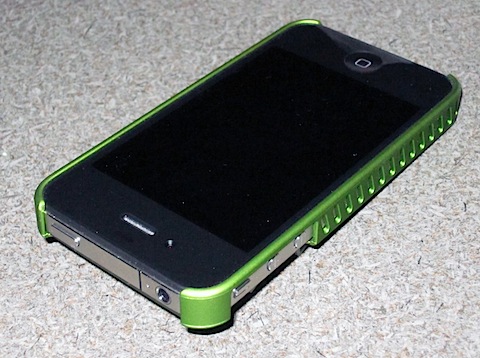
    IMG_0896 I just couldn’t afford to wait 4 weeks for my damn free bumper. The new smaller form factor caused the phone to slip out of my holster today. Can you imagine if I’d lost the phone? It’s not worth risking it, so I picked up one of the cheapest I could find at Best Buy and, frankly, it makes the phone 100% better.
    Not only did it completely resolve any variable signal issues, but it now fits in the holster and the unpleasant edges are softened just enough that the phone now feels great in my hand.

    Plus, it’s green and I like green. A Lot.

  • iPhone 4 and bumpers

    Back on July 17th, I ordered an iPhone 4.

    I knew about the so-called antenna-gate problem, and I waited until Uncle Steve gave the word for free iPhone bumpers/cases to mitigate the problem. I’d also been down to the Apple Store and checked out the issue myself. Even inside the Apple Store it was apparent that signal strength was distinctly altered by the way you held the phone, but, the potential for problem that this might cause versus the benefits was not sufficient to stop me from ordering one. Especially since I had always intended to have some form of bumper case on the iPhone 4. It was clear that Apple would be supplying free bumpers, but details of how that would happen were not yet announced.

    Now I can tell you why their plan blows.

    I was given an estimated delivery date of August 12th because of the backorders! I would have ordered a bumper at the same time, but they weren’t available to be ordered (for free of for cost) because of the pending free bumper program.

    So, would I just get a bumper along with the phone? No, when the details of the program were released, it turns out you have to download an app for the iPhone 4 and order from there. I heard a lot of people say how clever that was. Bullshit, it was.

    Until I received my phone, I wouldn’t be able to order the (necessary) bumper. Inconvenient, but I supposed I would be able to live with it for 3 or 4 days until my bumper could arrive after I ordered it.

    Last Monday I received shipment notification that my phone had left China, arriving on August 9th, although the Fedex website said August 10th. It arrived in Alaska by Wednesday and there it stayed, and was, according to their site, still in Alaska when I left work Friday afternoon. Imagine my surprise when it was sitting in my house when I got home 30 minutes later!

    For grins, I checked the Fedex website and my phone was still in Alaska. 2 hours later and the website was updated to show that it had been traveling down the coast since Wednesday.

    My first order of business was to get the phone activated. When you upgrade an existing phone via mail order, when the new phone is plugged in, it automatically transfers the service from the old phone, and this process was fairly painless. My old phone shut down within 5 minutes and my new phone activated within 5 minutes after that. I restored the backup from my old phone and that, ultimately, took many hours. Once it started to sync music, I got bored with watching my new phone do nothing and cancelled the sync and saved it for bedtime.

    Once the phone was in my hands, I started checking all my applications. All my passwords were gone, but that’s a minor inconvenience and probably a “good idea anyway”. Once I got that sorted out, we went out to dinner for some field testing.

    Without a bumper, in places, I’m having significant problems with signal strength. On some occasions, when I pull the phone out of the holster, I have no 3G and No Service, which is well frustrating. Setting the phone on the table resolves the problem.

    It was imperative that I order my bumper right away. Here’s why the program blows. I’ve already waited 3 weeks for the phone, which I have to have before I can order the bumper. Now, I have to wait another four weeks for the bumper! They need to get phones and bumpers into the customers’ hands at exactly the same time.

    I’ve tried using a piece of plastic film over the sensitive antenna areas, and that helps, but it won’t stick, so I’m left holding my phone gingerly and awkwardly, or learning to type left handed while I wait for a glacially shipped bumper.

    Enough griping about the bumper issue, lets talk about the phone.

    I’m not a fan of the new form factor, which surprises me. I think I preferred the rounded edges. That said, the unit feels firm and solid in your hand, even a bit heavier than the old 3GS, but that may just an illusion. I do like the new buttons.

    The new Retina display is awesome. Everything looks crisp and sharp. Even under a loupe it looks great.

    The “new” camera produces nice pictures, but the flash and video light has a bluish cast to it. Still, it’s better than nothing. The distance of the flash seems pretty short, but adequate for shots in dark restaurants. There’s a certain quality of being lighted by a flashlight to it. The HD video is very nice, but I’ve yet to determine how much video I’ll actually be able to record, since my phone is perpetually 95% full of music.

    Phone calls… I don’t know. I’m not due to make a phone call for a another few days. I’ll let you know when I’m forced to talk to somebody on the phone.

    The processor is zippy and it feels as quick as the iPad.

    Finally, the big thing is supposed to be battery life. It’s better. Difficult to quantify, though. Last night at about 11, my phone was down to 39% and I hadn’t done a lot of driving (My car stereo charges my phone) so that’s probably a bit better than the 3GS, but I’ve not suffered from the battery problems that other people report, perhaps because I don’t waste my time talking on the phone. I have noticed that when the 3GS has bad signal, batery life is seriously degraded. Since I don’t have a bumper and my signal is all over the place, my battery life may not be up to the capacity it would be if I had a bumper.

    I want my bumper.

    IMG_0005 IMG_0006

    IMG_0008 IMG_0007