Category: General

  • Taiwan 2010 – And They Think My Taste is Weird

    We bought high speed rail tickets at 7-11 and with the purchase we got several free bottles of tea. (Pictured here.)

    It’s green tea with barley, buckwheat and black bean.

    It tastes exactly like someone disolved a bowl of Cherios into green tea. Yuck!

  • Taiwan 2010 – A Monster For Ice

    To say Taiwan is a country of fads is to say fish like water. They get passionately crazy about the weirdest things!

    Last week I mentioned the curious food of fruit and condensed milk served over crushed ice. In my opinion this had to be the biggest dessert scam ever perpetrated against humanity.

    Biggest of them all was Monster Ice in the Yongkan food street area. The lines to get in where monstrous. Dozens of businesses serving identical food exist and yet none were as popular. You see, Monster Ice had “the name.”

    But then it was gone. Somehow shutdown in a bitter divorce fight. People were crushed and, according to the news last night, the entire economy of the street was dealt a 20% cutback in business – and this on the street with Din Tai Feng, my favorite curry katsu shop and dozens of other award-winning restaurants. Tours are organized from other countries just to come to this street to eat.

    (My opinion is that the global recession may be more at play than a lack of Monster Ice.)

    However, last night on the news there was a long and breathless piece on the re-opening of Monster Ice today. They even had a press conference! All the other businesses are rejoicing!

    Well, of course, we had to take a look.

    It was busy – how could it not be with all the publicity, but it seemed they’d laid on about 20 people in crowd control staff but that they outnumbered the customers.

    Irene decided that since the line wasn’t too long, she’d get some. She says it’s just the same. How could it not be?

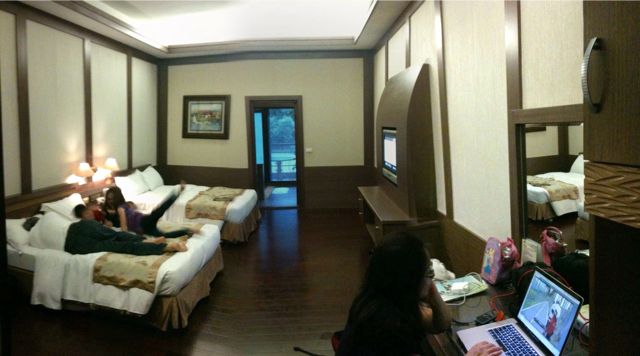
  • Taiwan 2010 – Our Phenomitastical Room

    No written content, just a couple pano pictures to show you our room.

  • More Podcast Fun – Episode 6 is online

    Being on opposite sides of the planet has stopped Ben and me from recording and posting the latest episode of the Fusion Patrol Podcast. Check it out!

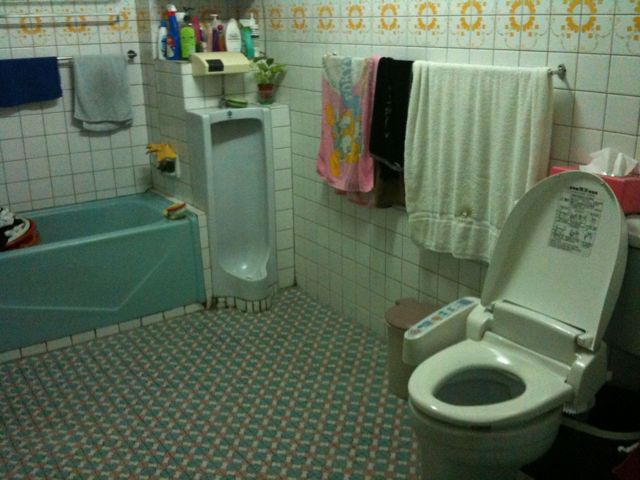
  • Sometimes we forget the wonderful things

    Honestly, how did I forget this wonderful thing? My in-laws’ house has a urinal in the bathroom!

  • Last Day of (Private) School

    Yesterday was the last day of school for the kids, which I’m finding an oddly bittersweet affair.

    The fact is, it wasn’t just the last day of school for the year, it was the last day of school at their current (now former) school.

    It had not been our intent when we started having children to send them to private school, but there are no public pre-schools, so if you want your child in pre-school, they’re all pay-as-you-go.

    Michelle was and is extraordinarily bright and when it came time to put her in pre-school, we decided to go with one of the very best private schools in the state, Rancho Solano. There’s a campus near us and while the tuition wasn’t cheap, we could afford it. We intended to put her in a highly-rated public traditional school when she went to kindergarten.

    Although the curriculum runs a year ahead than a standard school, Michelle absolutely thrived there and has been essentially an A+ all the way. We simply had no desire to remove her when it came time to go to Kindergarten because both she and we loved the place.

    Similarly, when it came time for James to go to pre-school, we started him there also. He’ll be going on to Kindergarten next year.

    Unfortunately, the school has been raising tuition most every year and with the state budget crisis, we’ve been loosing income. Even with the tuition donations of some very nice people and scholarship assistance from the school, we simply could not afford to continue on – not if we wanted to keep making house payments.

    And so, when I picked up the kids yesterday, I knew it was the end of one chapter in their lives and the beginning of a new one. I’m genuinely sorry that this had to happen and I feel like I’ve let them down. It is, after all, just their entire future I’m trying to lay the groundwork on and I’ve not succeeded in arranging the best possible situation.

    It’s both funny and sad how one’s plans can be derailed by the capricious nature of external forces.

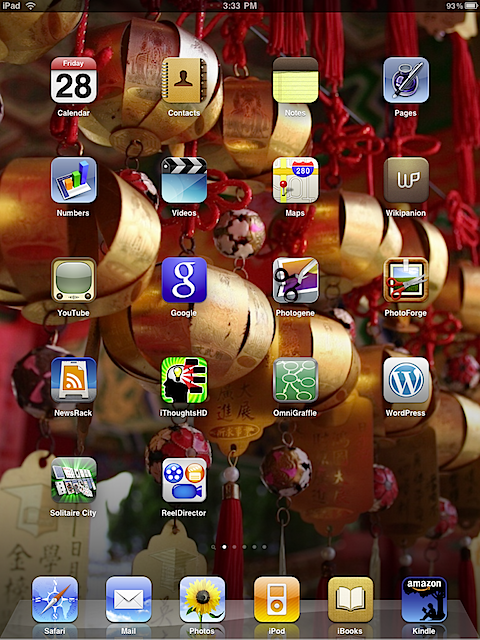
  • What’s on My iPad – Page 1

    IMG_0016 So it’s been nearly a month or so since the iPad hit the streets in the US and 48 days since I got mine. In that time, it has become an indispensable item in my hi-tech arsenal. With the iPad reaching far-off lands and foreign shores today, it’s time for the first in a series of thoughts about the various apps I’ve installed on my iPad.

    First, I’ve got a few thoughts about the iPad in general. There’s nothing particularly earth-shaking or revolutionary in my thoughts on the device but they warrant repeating.

    Unlike the iPhone, the iPad is not a ubiquitous device. It isn’t just magically at your hip and unless you’re in the habit of carrying a knapsack with you, as a student might, you have to plan to have it with you.

    I had the same exact problem with my laptop. When I went places I had to decide, with the convenience of having the computer with me outweigh the inconvenience of having to carry it and keep an eye on it when I’m not using it? 99 times out of 100 the answer was, “no”. With the iPhone, it’s “yes” 99 times out of 100. The iPad falls somewhere in between, and I’m still developing my habits in this area. If I go out for breakfast on a Saturday morning amongst the loonies at Chick-Fil-A, I’ll take it with me. Free Wi-Fi, a playground for the kids and reasonably neat food is a perfect combination for the iPad. Around the house, unless someone else in the household is using it, it’s pretty much always in the room with me. It’s awesome for reading my mail, checking the web, reading my RSS newsfeeds or just grabbing it for a quick games of solitaire in a down moment.

    It’s also quite sufficient for making (typically shorter) blog posts and online comments. Typically it gets tiresome after 3 or 4 good-sized paragraphs. (I’m not typing this review on the iPad, but I could have. I can’t say the same for the iPhone.)

    The iPad was billed as a “content consumption” device, and that’s certainly true. but as you’ll see from a few of the apps I use, it’s a lot more versatile and developers are beginning to make some awesome content manipulation and creation applications for it.

    One thing that the iPad does, exactly like the iPhone does, is to encourage you to end up with software you never use but you can’t bear to part with. Unlike the iPhone, iPad software is often much more expensive. In face, I have one app on my iPad that cost $50. I probably don’t have a total of little more than $50 worth of apps on my iPhone.

    Looking at the first page, and going in no particular order but vaguely left to right, top to bottom, here’s what I’ve got.

    Calendar, Contacts, Notes, Maps, YouTube, Safari, Mail, iPod are all basically the same as the iPhone, but scaled up. Videos is new, but is mostly the video function of the iPod made into a distinct app. Videos on the iPad are gorgeous and while I generally poo-poo the idea of a person video device, I regularly use the iPad to watch Dr. Who episodes for review. The iPad, with easy backward and forward, high resolution and headphones makes for a great environment to really concentrate on a show (and thus give me more details to pick on.)

    Pages and Numbers (I have no use for Keynote) are nice implementations of Apple’s word processor and spreadsheet. On the Mac, I use Pages, but I tend to avoid the “fancy stuff” with templates and rather just start with a blank page and type. As such, Pages on the iPad suffers from the 3 or 4 paragraph and I’m tired syndrome, but it does doa good job of rendering more complex page layouts. Numbers, which is much less typing intensive, it really nice. For what i use it for it’s as good as the full version and more convenient on the iPad.

    Wikipanion is an app I have on both the iPhone and the iPad, and I wouldn’t be without it. It’s a great interface on Wikipedia that works better than a web-based search. This is a common theme on iPhone OS devices. Apps can be made better than web pages – bucking the recent trend on the Internet in the recent years.

    Google search is a standalone Google application, it’s main superiority over the browser based version (it is in the tool bar on Safari, afterall) is that it has voice to text search capabilities and they are quite good. The iPad’s microphone is remarkably good – every bit as good as the one on MacBooks. In fact, the iPad works great for Skype, which really surprised me.

    Photogene and PhotoForge are two photo manipulation apps. I have several others on my iPhone, but these two have made the jump to full iPad apps and the added screen space really makes the difference when doing photo manipulation. Photogene is the more polished of the two apps and has a lot of Photoshop like filters and adjustments, but it doesn’t have an retouching tools. PhotoForge is less polished, but has some cloning and smudging tools – which is why I have both on the iPad.

    NewsRack is my RSS reader. It ties directly into my Google Reader account and this is the app I use more than anything else on the iPad. I have hundreds of RSS feeds I monitor and NewsRack makes it simple. On the iPhone I use ByLine, which I still like better, but ByLine hasn’t made the jump to the iPad and native iPhone-only apps mostly such blown up on the iPad. Yes, they work, but, you really feel the pain. I’m hoping ByLine gets with the program and gets an iPad version out soon. Not that I have any real complaints about NewsRack.

    iThoughts HD is a MindMapping software, which I like much better than MindMapping on the MacBook simply because you can carry it around like a notebook and do your mapping on-the-fly in meetings. The fingers to screen paradigm, rather than mouse to screen, really shines for this type of program. MindMapping is about taking notes and organizing thoughts and the iPad is a great way to do it.

    OmniGraffle is a longtime Mac graphing/template program (similar to Visio on the PC). Their iPad version costs an astounding $49.99, but I have it here because I do lots of charts likes this. Normally I do them on giant sticky notes on my wall – and my coworkers can attest, I have them everywhere with design and flow ideas. I bit the bullet for OmniGraffle for the iPad because, like iThoughtsHD, I felt this would finally be the right tool for doing this sort of design on the fly, in meetings and other impromptu situations. For $50, I have a few complaints about how it works, but I’m confident these are mostly bugs that will be resolved soon. Text boxes in UML diagrams in particular are irritating as they keep resizing and double text while you’re editing it. But if you’re doing flow diagrams, it’s pretty much perfect.

    WordPress is a free interface to WordPress blogs, like lonelocust.com. I use it for blogging, but detest the fact that you have to do all formatting in HTML. The iPhone and iPad keyboard is not friendly for type XML elements like <b></b> This limits how much I’m willing to blog in the program. Recently I’ve started experimenting with BlogPress, a not-free app that seems a bit better, but still limited. This is an area when someone could really make huge improvements.

    Solitaire City is probably the second most used app on my iPad. I love a good game of solitaire and Solitaire City is great. Easy to use, has lots of games and variations and is just a nice, rich visual presentation. If only it would not shout “Yaaahooooo!” whenever you win a game. I could really do without that.

    Next, there’s ReelDirector, a video editing program. Honestly, I’ve not had much time to test this on the iPad. I purchased it for the iPhone and they’ve since updated it to be iPhone/iPad native in a single version. Many developers are making second versions of iPad only software and from a development standpoint, there are legitimate pros and cons for either way. It’s seems that what’s happening mostly, though, is that developers are realizing if they upgrade their iPhone version to be native on both, everyone just gets a free upgrade. If they make a separate version, they get paid twice and they almost all charge more for the iPad version.

    I wouldn’t have bought ReelDirector for the iPad but since it was a free upgrade, I’ll try it. The interface on the iPad seems a lot easier than the iPhone version, but there’s a problem with content. On the iPhone 3GS, you can shoot video, then edit it with ReelDirector. If you sync you photos to a computer, the videos and photos are removed and then synced back as part of your normal photo albums. Video, by default, are not synced back and so disappear from your phone, so you have to make that change to your settings to have an archive of video available for the program.

    Second, you can’t put videos on that weren’t shot with the iPhone – at least I haven’t been able to trick it into accepting them.

    Finally, the iPad has no camera, so, you have to shoot on an iPhone 3GS, transfer to your computer through iTunes, then have iTunes sync the videos onto the iPad, otherwise, you’ve got nothing to edit. That’s too much of a pain in the rear. If I’m going to sync it to my computer, I’ll just use iMovie or Final Cut to edit. I guess if all I had was Movie Maker on a PC, I might push it back to the iPad to edit elsewhere.

    Finally, I have iBooks and Kindle at the bottom, two e-readers. I like them both. Ibooks is easier, more visually appealing and has in-app purchases of books, but Kindle has a much larger book selection and you can sync your last read location across several machines, such as real Kindle. Honestly, they’ll be selling “real” Kindles and Sony e-reader in the discount bin at Big Lots in a year. Who would want one of those horrid things when you can have an iPad which does so much more.


  • Doctor Who – Review – Amy’s Choice – Spoilers

    Low self-esteem reaches new heights.

    Synopsis

    Leadworth, circa 2015, Rory and Amy Wiliams (nee Pond) are on the verge of having their first baby when the Doctor returns to their lives, five years after leaving them.

    Not everything is as it seems, though as they all wake up aboard the TARDIS back in “regular” time. The Doctor is confronted by the mysterious Dream Lord, who hates the Doctor, and he sets him a challenge: One of the two worlds is real, one a dream. If they die in the dream world, they awake in the real world. If they die in the real world, they die. To add an element of urgency to the proceedings, the TARDIS goes powerless and begins plummeting towards a “cold star” while in the Leadworth world, the OAPs reveal themselves to be alien-infested invaders and begin killing everyone in town. Ultimately, Amy must decide if her future lies with the Doctor or with Rory.

    Analysis

    This is an unusual Doctor Who story and one that deconstructs along interesting lines, but ultimately, the story fails for me, but only just.

    We are presented with two different Doctor Who stories; the Leadworth and TARDIS stories. Their dilemma is to figure out which one is real, but as presented to the audience, there can only be one choice: Leadworth is the fake. (You’ll note, I said “…as presented to the audience” Consider, with Leadworth we have to take the most untold story to set it up. We know that the Doctor, Amy and Rory were on the TARDIS at the end of the previous story and Rory was going to travel with them. We have to accept that they’ve skipped five or more years to accept that they’re living back in Leadworth.

    Also, the TARDIS storyline is fatalistic, in that (it appears) that the Doctor is powerless to stop them from dying and doesn’t even try. It is, in effect, the ticking clock on the time bomb. In 40 minutes, you die.

    However, in Leadworth, they could go on forever, simply by escaping the town, or finding their way back into the TARDIS. From the standpoint of the story, this means that a decision needs to be made in Leadsworth.

    It seems painfully obvious to me that you were supposed to decide that Leadworth was the dream and I came to that conclusion as soon as the nature of the threat was revealed in both storylines. There was just minor thing niggling at the back of my mind: Whenever something is “painfully obvious” I’m always suspicious that the writer is trying to trick the audience. The writer was “tricking”us, both worlds were dreams but in all fairness, I did not figure that out.)

    On second viewing, I liked the story better, partially because it got to spend a little time examining what I call, “The Companions Dilemma.” The moment of a companion’s departure has always been problematic. The Doctor literally dumped his granddaughter, forcing her to stay on Earth with the man she fell in love with. Ian and Barbara finally got to go home back in the days when the Doctor could never, ever arrive when and where he wanted to be. After that, though, the companions rarely show any indication that they’re going to leave until moments before they do.

    I ask you, is that what you’d do? I don’t think I would. I think I’d stay aboard the TARDIS forever. Why would you leave it? It’s the very question Amy asks Rory, “Why would we give up all this?” Since the series’ revival, this has become a very sticky problem, because the companions are obviously a lot more emotionally invested in the Doctor as a partner rather than as a father-figure. It’s terribly sad (and I’m not looking forward to it) but all little girls grow up and leave their fathers. There is an inevitability about it that we must expect. When someone leaves their chosen partner, it is a different dynamic. Few people go into relationships with the idea that someday they will leave and so when they do, it’s often a time of acrimony and disappointment.

    In a TV series, no one wants to see a beloved companion depart on acrimonious terms – we want to remember our TV friends as they were, and so the departures of Rose and Donna were contrived to make it impossible for them to stay. The departure of Martha was so poorly realized that to this day one would think she’d been fired on the spur of a moment rather than as a planned departure from the show.

    In any case, Amy’s Choice is partially an analysis of why people stay and what might make someone leave. Clearly Rory prefers Leadworth and Amy prefers the TARDIS. When she finally realizes that she really loves Rory and can’t live without him, she grows up a little bit right in front of our eyes.

    The other major plot, and part of the reason the story ultimately fails for me, is the Doctor’s self-loathing. The Dream Lord is himself; his own deep, dark side that dislikes what he is and how he treats his friends. The story would have a lot more impact over the course of the episode if we knew this from the start, but instead, the reveal that the Dream Lord is the Doctor comes tacked on at the end like an afterthought.

    If someone is making snide remarks about someone else, it has a certain weight to it. If they’re making comments about another person and you recognize those things to be to a certain degree truthful, it has more weight, but if a person is making comments about themself it opens up a whole insight on that person. By saving the reveal of the Dream Lord’s identify to the end, you have to go back and re-evaluate what you’d seen earlier. That’s why this episode is better on second viewing. What the Dream Lord says is much more important the second time through.

    If I had to rate this episode on a scale of 0 to 100, where 50 equates to “approval”, I’d have to give it 49.9999. It just misses by the smallest of margin.


    Ben and I chatted about this episode in greater detail over at the Fusion Patrol Podcast. You can listen to the episode here:


    Powered by Podbean.com

  • Posts without Points

    I’m testing BlogPress on the iPhone. I have time because I’m bored at Old Navy.

    See? Boring video, too. This is, of course, a test in advance of being in Taiwan.

    YouTube Video

    – Posted from my iPhone