Blog

  • iPad Notes and Review

    I promised my incoherent thoughts on the iPad after days of use and here they are… in no particular order.

    iPad notes

    • Carrying it is awkward. There’s just no good way to carry the iPad by itself. You’d think it would be natural to carry it like a textbook, but it isn’t. No matter which way you hold it, your fingers are grasping slick glass on one side. it doesn’t feel secure or natural. Therefore…
    • A case is mandatory. I tried to get away without buying one as they’re ridiculously expensive (for what they are) but the iPad just needs something. I think, perhaps, in the future I’ll get one of those portfolio types similar to a zipped up paper pad, but for now I’ve just got a neoprene sleeve.
    • Videos are fantastic. Hand down, video looks great on this thing. Whether it’s iTunes movies, videos I’ve made myself for my Apple TV or Youtube videos, they really shine. The lack of a 16:9 aspect ratio isn’t that big of a deal. Youtube videos on webpages now play inline rather than jumping you to the YouTube as the iPhone does, which is very refreshing and apps like ABC’s TV service is magnificent. Pity ABC hasn’t got jack to watch. Here’s hoping soon for Hulu, CBS, NBC and the others to follow suit. I hear, but haven’t seen the Netflix streaming rocks, but I don’t have a Netflix account, nor am I likely to ever get one until the have a pay-as-you use plan rather than a flat monthly fee. Not enough movies in the world that I want to see to justify a monthly expense.
    • Brightness control is inconvenient. The iBooks program recognizes that easy to adjust brightness is critical for using a screen like this and builds it right into the program. Sadly, I’m learning that’s a forbidden, undocumented API that Apple alone uses and other programs cannot use it without risking Apple’s wrath or rejection. To change the brightness otherwise, you have to dig into settings, which is a hassle when you’re just moving from room to room. Supposedly, the iPad has auto-brightness but it doesn’t seem to work too well. I’ve not noticed any dimming or brightening at all.
    • Many apps are “splitting” into an iPhone and an iPad path. I think it’s pretty clear that Apple would like all developers of iPhone apps to use the dual-target, universal binary to produce a single app that runs on both platforms and takes advantage of the environment its running on. There are pros and cons against that modality. Yes, it’s great when I pop open a program that I had previously purchased on my iPhone and discover it’s been ported to run bigger and better – and yes, it is better – but at the same time, any graphic intensive program would require that higher resolution graphics be stored within the application bundle, resulting in bloated app packages, straining your already full iPhone for no benefit to the iPhone. Consequently, many programs now have iPhone and iPad versions. This is confusing because I don’t know which app developers might have released a newer better version since it is outside of the normal upgrade path provided through iTunes. But that’s not all…
    • Apps are beginning to cost more. That’s great if you’re a developer. iPhone apps have been pigeonholed into the free/$0.99-4.99 paradigm because that’s the prevailing wisdom. iPhone apps are an impulse buy and that means low-price. The price is completely divorced from the amount of effort involved in the development. Apple has sent a signal by releasing Pages, Numbers and Keynote at $9.99 – it’s OK to charge more for advanced apps. That’s great, but it certainly will (should) slow down app purchases. That said, I think I’ve spent more on iPad apps already than I have in their entirety on my iPhone. OmniGraffle has put out what looks to be a kick-ass flow charting/design program, but at $49.99… it’s going to have to wait. Come to think of it, Omni Group’s programs on the Mac are always just a little too expensive for my blood.
    • iPad apps are better. Ooo, this will probably get me in trouble with somebody but, here’s how I see it. iPhone OS is brilliant, it really is a ground-up rethink of the computer operating system which is what was needed for the iPhone. Previous mobile phone approaches (are you listening Microsoft) took the computer OS and scaled it down. That is, they cut it down. That was the wrong approach. Let’s face it, the iPhone’s screen is small. There’s not much room to work with and they made it work. Now, on the iPad, it’s like they’ve been taking steroids. It is bigger and better and the ground-up rethink is really paying off because you can do so much more, but you’re still working within an intimate space. I don’t know that you could continue to scale it up indefinitely, but at the iPad’s size, it’s wonderful.
    • Any purchased iPhone/iPod Touch apps you have will transfer to your iPad. In case you didn’t realize that, the copy protection applied to your purchased apps is applied at the iTunes library level, not the device level. That means if you’ve already purchased it, it will load right onto your iPad, assuming (a) that you’re using the same iTunes library and (b) the app is compatible with the iPad. (It might be possible that one isn’t, but the vast majority are.)
    • iPhone apps don’t cut it on the iPad. There’s an odd sort of delight when you pop open one of your iPhone apps and it turns out it’s already ported to the iPad. More importantly, there’s a crushing letdown feeling when you open on and all you get is the iPhone penalty box. Similarly, there’s a letdown when they don’t. The single size mode just feels bad and the double-sized mode looks awful. Very few of the programs I have on the iPhone are acceptable on the iPad.
    • My Bejeweled 2 scores are going way up. That having been said, at least Bejeweled 2 is passable on the big screen in double mode, and my scores are going way up. It’s much easy to see and manipulate those little jewels on the bigger screen.
    • I am not enthralled with programs that have functions that only work in one orientation or another. That requires a little explanation. You may recall the other day that I said at the Best Buy I was having some problems with Pages on the iPad. Specifically, I couldn’t figure out how to get out of the damned document and start a new one. Answer: You can only have that menu in portrait mode. In landscape, which is the easiest to type in, the menu doesn’t come up. I don’t like that. Developers – stop it. Do not do that. Bad developer, bad, bad, bad. Rolled up newspaper time for you. The user should decide which orientation works best for them.
    • You can type on it. At least, you can type on it better than the iPhone. In landscape orientation I can type two-handed, 10-fingers and quite quickly; however, punctuation is still penalized by having to switch to a secondary keyboard mode and it begins to jar the fingers knocking on the screen after a short period of time. I’ve never really had too much trouble with typing on the iPhone, but the iPad is better – hands down. (Actually, I think all my typing problems on the iPhone are actually a plot by the developers of the iPhone Facebook app. I think they’ve written the code to randomly misspell one word in every Facebook post I make, not matter how careful I am.)
    • Not enough books and you can’t see what they are until you own an iPad! The iBooks reader is gorgeous and works well, but, before I bought the iPad, I wanted to know what books were available. No can do, the only way I can find to see what’s on the iBookstore is to have an iPad and iBooks. Silly Apple. There aren’t enough books (yet) in the store, and hardly anything on sciences (especially paleontology.) I imagine there’s plenty of fictional bestsellers for the dim sheeple, but I don’t care.
    • Kindle works nicely, but isn’t as polished as iBooks. Amazon cranked out their Kindle app for the iPhone rather quickly and it’s also very nice. I liked it on the iPhone, but after purchasing a couple books, I never finished them. It’s too much of a eye strain to read them on the phone. Joy of joy, my previously purchased books synced right onto the iPad and were at exactly the point I left off. I’m finally going to get to finish Capture the Saint by Burl Barer (the only Saint book I haven’t been able to buy in print) and The Lost World by Arthur Conan Doyle. (I know, I know, you’d think I’d have read that, wouldn’t you, but… I haven’t. But I will now.)
    • There is no comfortable position to sit and use the iPad. At least I haven’t found one. It’s too heavy to hold as a book for long periods of time and I think that may be exacerbated by the thinness of it. It feels a little unnatural to hold, but then a lifetime of holding books feels natural because that’s what I’ve done for a lifetime. I have a size and a weight expectation. We’ll see if time will change my opinion on this.
    • Mail and Safari are particularly nice. They’re really nice, The big screen for Mail and the inline videos for Safari really seal it as a great way to browse and read mail. There’s a buggy or two in Mail, especially when changing orientation. You can get out of a mailbox, work your way back to the root, even start down towards another mailbox and, if you rotate the screen, you’ll find yourself back in the original mailbox you started from. That’s annoying. It’s especially bad when you have the iPad fasted to the airbag section of your car’s steering wheel and using it to read mail while you’re driving. Sometimes if you make a fast turn, you spin the wheel enough to change the orientation and you loose your place*. Thank Apple for the orientation lock.
    • No problems, so far, with wireless. Others are reporting problems with their wireless connections. I’ve not experienced any problems. It worked first time, zero hassle, immediately. it even worked when we took it out to restaurant yesterday and glommed onto their free by authenticated network.
    • File sharing is weird to implement. Programs can now “save” files into user space for later retrieval, such as Pages being able to save PDFs, Word Docs and Pages Docs for moving to another computer, but it’s all done through iTunes and completely non-intuitive. I knew it could do it, but I had to look up how to do it on the ‘net. Minus several points for hiding this important feature where no one would look for it.
    • I wonder if the need for apps will decrease on the iPad when people realize the browser is more full featured. Steve Jobs recently pointed out that, at least for the iPhone (and therefore the lion’s share of this market) people use apps more than web browsing – hence the initiative to create Apple’s iAds service for monetizing apps – but I wonder if that’s because an app can deliver a much better experience than a web app on the iPhone? Safari’s browser is much better on the iPad. It’s possible that people will again begin to shift back towards online services over apps.

    Those are my thoughts so far. Perhaps they seem a bit negative, but they aren’t. All in all it’s a great little device and the potential seems limitless. Next time, I’ll talk about some of the specific applications, like Popular Science Mag+ electronic magazine and Marvel Comics e-comic reader. (I’m going to have a guest reviewer and well-placed insider in the comic book trade giving me his feedback before I write that one. Will the iPad finally kill the comic book? Will there be a super-hero created by bitten by a radioactive iPad? Find out next time… or whenever I get around to it, same bat-time, same bat channel.)


    *Oh, and people, that part about the driving and stuff… totally a joke. Like my wife would let me have the iPad when I driving. She’s totally monopolizing it to read The Lightening Thief.

  • I’ve got an iPad

    I’d written up this long, convoluted post about my travails trying to get an iPad, but by the time I’ve gotten around to posting it… I finally got an iPad. I guess I’ll recount the story anyway.

    Let’s rewind to Saturday, April 3rd, the very first day of iPad sales. As you may recall, it was at that point that I started saying, “I want an iPad.”

    Saturday: We went into the Best Buy on Camelback road at around 8:00PM and, although the store wasn’t terribly busy, there was still a cluster of people around the Apple mini-store. There were 4 iPads on display, all of them was being tested by children. A small group of people were standing by hoping to get to play with them.

    One teenager, the oldest, seemed the most oblivious, so I came and stood right next to him and made a big production out of trying to watch everything he was doing. He was still oblivious.

    After about 5 minutes, his parents and a couple other kids came over, he then started to explain the iPad to them in great detail. After two or three minutes of him gushing on, his mom said, “Have you been on this the entire time since we left you?”

    “Yeah.”

    She looked at me, “Are you waiting to try this?”

    “Yeah”

    …and she kicked him off and gave him a bit of an earful. Good for her.

    While I’d been waiting, I’d noticed that people were actually buying iPads – they weren’t out of stock.

    I played around with it and came to my somewhat surprised conclusion. (Which I’ve documented elsewhere) I went and got Irene and the kids and, after a little wait, got them onto an iPad. Moments after Irene said, “I want one.” I checked with the Apple guy who told me they had a “couple left” of each of the models; however, Irene wasn’t quite ready to buy.

    We went home, leaving that damned teenager once again reattached to the iPad and giving his family a lecture.

    On the way how we thought about it. We considered turning back. Best Buy closed in under 30 minutes. We just had time… but… we didn’t.

    We went home to check to see if there were any government employee discounts. There aren’t.

    We checked to see of there are any educator discounts. There aren’t.

    Amazon hasn’t got them, so there’s no tax-free option.

    Basically, if we wanted an iPad, there’s no option save for paying the $499 + tax.

    I checked online and realized that Best Buy was closed on Easter. That meant that whatever stock they had at closing time Saturday would still be there at opening time on Monday. I hatched my cunning plan: An early lunch, timed to arrive exactly when Best Buy opened and an iPad would be mine!

    Other obstacles got in the way, but ultimately, I found myself pulling into the parking lot of Best Buy, 5 minutes before they opened, fully expecting to walk in, straight to the iPads and buy one before they had a chance to run out.

    Apparently, 40 other people had that idea, too, because there were that many people standing at the door waiting for it to open… and so I didn’t get an iPad. Again.

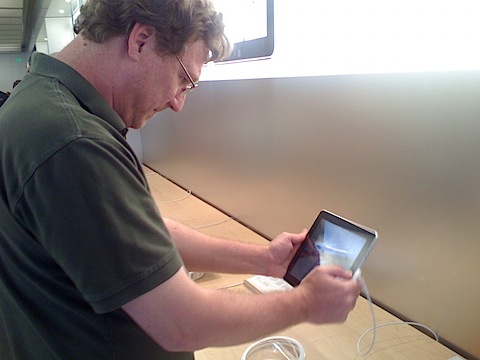
    Tuesday:IMG_0265 At lunch, John and I went to the Apple Store at the Biltmore. They have many more iPads on display and, just as at Best Buy the other day, Could see that people were buying and leaving with them. I decided to buy one right then and there. When I finally got the Apple Store employee’s attention (they were very busy) I learned that they didn’t have any 16GB models left, just 32s and 64s. I won’t be too harsh on him, but he indicated first that they got less 16s than the others and that people were realizing that 16 just wasn’t enough. I felt like I was being given a very direct suggestion that I should buy a bigger iPad; however, that’s not in the cards. The 16 is absolutely the most I can possibly afford

    The Apple Store guy had no idea of when the next shipment would be in.

    Friday: I had read on Thursday that people who had pre-ordered their iPads and didn’t get an April 3 delivery date, began receiving notices that their iPads were winging their way out of China. Figuring that Apple would no doubt also getting more stock at this time, I decided to try again. The kids had a half day at school and so I left work at lunchtime and still had an hour to go before picking up the kids. I stopped in the Apple Store and the same guy was there. I asked again about the 16s and the answer was negative. “Just 30 minutes ago we got a truck load of 32s and 64s, but not 16s. They don’t tell me how many we’re getting, what types or when they’ll arrive.”

    Discouraged, but still with about 45 minutes to kill, I started playing with the iPads on display. 5 minutes later a female Apple Store employee came up to me and said, “Excuse me, [Apple Sore guy] (indicating the guy I’d previously spoken to) tells me you’re interested in a 16GB iPad.”

    “Yes”, I said.

    “I’ve got good news. 3 minutes ago a truck pulled up with a shipment of 16GB iPads.”

    …and so I have an iPad, but not before she really put the hard press on me to buy… MobileMe (which would have extended my existing subscription out to about 3 years), AppleCare for the iPad (even if you want an extended warranty, you don’t need to buy it until 1 year has nearly passed), a case and/or docking accessories.

    I existed the store 5 minutes later with nothing except an iPad.

    I’ll post some thoughts on it tomorrow, but for now, the whole family is really enjoying it: Except when I have to fight to get to use it, that’s already becoming a problem.

  • MacBook Pro – After the honeymoon

    I really need to catch up on my writing!

    After my initial analysis of my MacBook Pro, I thought I should point out a few things after using it for a few weeks.

    In no particular order:

    • The edges on this thing are sharp. I’m not quite ready to take a file to it, but really! Did your ergonomic testers have bionic arms?
    • The battery life is phenomenal – most of the time. For the first week, I was regularly getting 7 or more hours from the battery every day. Then one day, I started to only get 4-5. Nothing was running, and I couldn’t hear the fans (although, they are so whisper quiet, you can barely hear them when they are running.) This went on for a week, then I happened to reboot. Suddenly, I’m back to 7 hours. This has happened twice since then and reboots always solve the problem. I can’t find anything running, but I think it may be tied to Xcode or Eclipse.
    • Despite the sharp edge, the laptop keyboard is still easier to type on when on your lap than the old MacBook was. Perhaps it’s just roomier.
    • The speakers have a really long delay when switching from internal to external, sometimes 3-4 seconds after the plug is in before it shifts to the external speakers.

    Still… I love it.

  • Doctor Who – The Beast Below – Review – Spoilers

    “Say, ‘Whee!’” – the Doctor

    I’ll skip the usual synopsis/analysis section and cut right to the bone: this was another fine episode of Doctor Who. With only two episodes of Smith’s reign and Moffat’s stewardship, I could hardly be happier with their start.

    This episode we get to see Smith in all his gangly, oddly walking Time Lord glory and he really does fit perfectly. I’m convinced now that he’s not aping Troughton and Davison, but that’s he’s settled on a persona that bears resemblances to them without being the copies. It’s perhaps the best example of “same man, different face” that we’ve yet seen in the actors who play the Doctor.

    For the first time ever, the Doctor finds himself in a truly unwinnable situation: He has three choices and in all of them innocents will be grievously harmed or killed. Gone is Russell T. Davies “the Doctor is an absolute moral compass” – or perhaps it’s still there, but we realize even with a compass, sometimes life’s decisions are about taking the least of bad situations.

    In the previous episode, the only thing that bothered me about the story was the fact that there were so many coma victims in such a small town, in this episode there were several points that bothered me:

    • Why did the smilers have rotating heads? Each smiler has three expressions, “Happy”, “Sad” and “Angry”, yet only two sides to their face – front and back. When ‘happy’ turned to ‘sad’ and then ‘sad’ turned to ‘angry’, the ‘happy’ face must somehow have been transmogrified to the ‘angry’ one. If the face could be changed, why bother rotating?
    • If the space whale refused to eat children over the course of their 200+ year flight, why did they continue to feed the children to them? Wishful thinking?
    • Having had the children not eaten, what do they do with them? Did they just collect the “zeroes” down in the tower?
    • When the children were inside the whale, as the Doctor and Amy were, how could the whale tell that it had children in its mouth rather than adults?
    • What was the point of having the recorded statement for the “protest/forget” voting booths? If you protested, you were killed, if you chose to forget, surely they would never let you see the recorded statement, otherwise, you could just tell yourself what you were about to forget.

    All that said, all is forgiven for this story, a truly unique Doctor Who story.

    Next week, the Daleks – I can already tell that I don’t like the idea of a phone-line to the TARDIS.

  • Ivory-Billed Woodpecker (or, is there are Dinosaur in my back yard?)

    Spring in in the air here in Phoenix, and with it warm, comfortable outside temperatures. We’ve often got the doors open to let in the outside air.IMG_3851

    Monday, when I was home taking care of a sick James, it was rather windy, and I kept hearing this noise. It was a very familiar knocking noise and yet at the same time, I couldn’t quite place it. I was certain it was something rattling in the wind.

    Today; however, it was dead calm, but the noise was still there.

    It was then that I realized what it sounded like: A woodpecker. I’ve never seen, heard or even heard of a woodpecker in Phoenix, but they’re not uncommon up in the mountains.

    I went out to the back yard and there in the pecan tree was a little red-headed woodpecker, knocking away at the tree. It also seemed to be paying a lot of attention to a hole in the tree I’ve never noticed before. A nest hole perhaps?

    Despite my life-long fascination with extinct dinosaurs, I’ve never cared much for our modern, avian dinosaurs – save for a few of the larger, majestic (and terrifying) birds of prey.

    Nonetheless, it was kind of cool to discover something other than those damned pigeons around the house.

    Full disclosure, there is no Ivory-Billed Woodpecker in my backyard because they, like non-avian dinosaurs, are extinct.


    Other photos of the woodpecker

  • Doctor Who – The Eleventh Hour – Review – Spoilers

    Matt Smith has made his debut as the Doctor in Steven Moffat’s new series of Doctor Who.

    Beware of the spoilers and keep reading after the jump if you care not of them…

    (more…)

  • I held an iPad – Now I Must Own One

    Honestly, I don’t know which to write about first – The New Doctor Who or the new iPad. As I sit here on the sofa with my nice, shiny new MacBook Pro (which I love dearly, it’s a wonderful laptop) I can’t help thinking, “Hey, there’s an iPad version of WordPress just waiting for me.” Would it be wonderful, or painful to use?

    Since I was holding an iPad thirty minutes ago and reaching for my credit card about the same time (spoiler: I didn’t buy one) I still have to say, “It surprised me.”

    First, it’s a lot smaller than I imagined. Looking at Steve Jobs hold one on stage, I thought it was much bigger than it really it. It looked about the size of a typical school textbook, but instead it’s more about the size of a modern hardcover novel, but much, much thinner. I’d compare it to the Oracle, AZ phonebook, but only about 4,000 people in the world would get that allusion. It feels about as thick as a Blue-Ray DVD case.

    Being smaller than I expected, the screen was better than I could have hoped. It’s bright, vibrant and alive, albeit smudged with greasy fingerprints from the great unwashed masses that were pawing the demo units. (I, of course, never exude grease from my fingers, the the iPad was cleaner after I used it than before.)

    Like the iPhone, the iPad is defined not by its physical description, but by its applications. The pre-App Store iPhone was still a wonderful advance over old smart phones, but the post-App Store has leapt beyond the imagination. Much is made of the restrictions Apple places on the App Store, but it is still filled with clever, fun, outstanding programs.

    Once upon a time – before PCs, before Apple – you didn’t buy computers because of the technology, you bought them because they had the software you needed to run. The App Store has brought thousands of programs and therefore thousands of customers to the platform.

    The people I know who buy iPhones buy them because of what they can do. Oddly, the people I know who buy Android phones buy them because they don’t want to deal with Apple or AT&T. Sucks to be them – that’s not carving out a market, that’s cleaning up the crap left behind. An honest living, but not usually the fast track to success – just ask the zookeeper at the elephant house.

    The demo units were fairly sparse on applications. There were a few games, which I didn’t bother with, the typical widgety stuff, like weather, and then the biggies – Email, Web Browsing, Photos iBook, Pages, Numbers, Keynote.

    Email wasn’t setup, so I didn’t test it out and I gave web browsing only a mild glance.

    Photos was gorgeous. I can easily imagine a photographer friend of mine carrying the pad around to show off photos. Yes, you can do the same on the iPhone, and I’ve done so, but the iPad’s picture viewer was stunning. It doesn’t hurt that the demo unit is loaded with professionally done photos, but I have no doubt that the picture of my latest pizza would be equally stunning.

    Pages, Numbers and Keynote seemed like they might just need a little instruction. I had some immediate questions about editing spreadsheets, creating and saving word processing documents that didn’t spring forth magically from the touchpad just because I was thinking, “How the heck do I do this?” Clearly the brain-reading interface isn’t installed on these new models and the multi-touch metaphor didn’t quite make it easy enough to make it obvious. Still, from what I did do with it, it was quite capable, although, like others have no doubt pointed out, I probably wouldn’t want to write a novel on it.

    iBook actually sold me on the iPad.

    I’m not a fan of eBooks. I like having a book, I like my library to be full, the shelves crammed with books. They give me comfort, enjoyment, accessibility and the deaden the echo of an empty room. They are convenient, nearly foolproof and, although I might be upset when a friend dropped one of my time-travel sci-fi books into his sink, ruining it (and it was out of print), I don’t feel quite the loss I would If my expensive electronic gadget fell in the toilet – taking not just one, but all of my books with it.IMG_3817

    I’ve played with a Kindle – it blows. I’ve played with the Sony eReader – it blows. The Kindle app on the iPhone – sucks, as do the other book readers. Some people read eBooks on their computer screen. I don’t read at my desk, that’s uncomfortable and ruins the experience. Even reading with the laptop just isn’t right. There’s nothing quite like reading a book.

    The iPad is the first implementation I’ve seen that I said, “This isn’t so awful. I could read a book like this.” More, I’m looking ahead to magazines. Much though I love having a collection of back issues Skeptical Inquirer, New Scientist or Fortean Times, I rarely read them and they collect dust and waste space. I’m very open to (lower price) magazine subscriptions (or even single issue purchases) on the iPad. While iBook doesn’t do that, it does point out that the form factor and the capabilities of the iPad are perfectly aligned for magazines.

    James was reading Winnie The Pooh and turning pages like a pro on the iPad in seconds. It is simple enough to be child-friendly, although I would worry about that glass screen and how James has a tendency to stand on his books.

    I have a few ideas for applications of the iPad and now, having touched one, I can see that they really are viable. This is a device that could be used in a variety of non-traditional settings. There are places were even a laptop is too unwieldy and intrusive. Small, lightweight, and most importantly – an actual real computer, with a robust development system – the iPad could (and I think will) begine showing up in places where you’ve not seen computers before – or seen them used awkwardly.

    Yes. I’m not saying anything that a lot of other reviewers have said before, and perhaps I’m just towing the party line, but playing with one makes you believe.

    I had absolutely no intention of buying an iPad for at least 90 days, perhaps longer. I’m sure Irene had no intention to buy one at all – they are, after all, a minimum of $500. Yet still, she played with the one at the store, read some of the Winnie The Pooh book with James, plunked around in Pages/Numbers/Keynote and she was almost sold. If best Buy had been open for another hour tonight (and not closed for Easter tomorrow) I’d probably have one. They did have just a few left of all models at closing time.

    You really do just want to play with it.

    I love my iPhone. It’s like an extension of me. It does all sorts of neat things and I’m always pleased to have those things with me, but at the same time, some of them are still a little laborious. Writing blog posts for example. I can do it on the iPhone but… it’s a chore. The iPad feels like a device that will make even those chores easy. Sure, it wouldn’t as mobile and therefore I won’t always have it with me like I do my iPhone and that might be a deal breaker in the end but on balance I think not.

    Time will tell. Perhaps Monday, even.

  • iPhone Gripe

    This is the first time I’ve ever used “airplane mode” on my iPhone. Why? Because the hotel we’re staying in is a complete cell phone dead zone. Neither my AT&T nor Irene’s T-Mobile us working.

    Why airplane mode? Because the phone is seeking a signal and running the battery down at a staggering rate.

    I’ve lost 25% of my battery in half an hour. There’s something wrong with this scenario.

  • Doctor Who on the Wii

    Honestly, this is in the Sun, which makes it about as reliable as Fox News, but, supposedly, Doctor Who will be coming to the Wii for Xmas.

    Apparently, the project has been in the works for a while, but the developers just can’t get into the “spirit” of Doctor Who.

    Former Doctor David Tennant said the game had struggled to get off the ground as some developers had wanted the Time Lord to beat up his enemies and blow things up.

    Who chiefs prefer the Doc to defeat baddies using his cunning rather than his fists.

    David said: “The video game was quite actively developed, but it’s difficult to nail as the Doctor doesn’t blow things up.

    He’s not Batman, who goes around smacking people in the head.”

    Read more: The Sun – Doctor Wii

    I suppose they were having trouble with the idea that a “sonic screwdriver” is a tool, not a kung fu attack move.

  • Stop Picking on the BBC

    While the BBC may have it’s problems, it’s the envy of the world, or so says David Mitchell in this week’s Observer.

    I agree, or I wouldn’t be posting this here.

    These contradictions make it very easy to find fault with the BBC and let its critics evade the real question which is, simply: do we want it or not? It’s a binary choice, all or nothing. I once came across a very persuasive analysis of organisations (it’s from the book Intelligent Leadership by Alistair Mant) which divides them into two categories: bicycles and frogs.

    A bicycle is put together from interchangeable parts. You can take a bicycle-like system apart, polish or improve elements and then reassemble it into something that works better. A frog, however, evolved as a whole. If you chop a little bit off, it’ll muddle along. And another little bit and another and it’ll still be a frog, albeit a less functional one. But finally, with one tiny further change, it will cease to be a frog and nothing you can do will ever put it back together. Well, the BBC is an organisation to melt Miss Piggy’s heart.

    From: If you think Ashcroft is a scandal, what about the attacks on the BBC? | David Mitchell]

    By the way, Auntie Beeb, my offer still stands: I’m ready to pay a full license fee for the privilege to see the (unadulterated) BBC here in the US. Even streaming over the Internet is good enough.