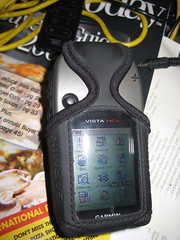
This is the third (and final) part of my reactions to my new Garmin Vista HCx model GPS. This installment is computer-related pieces.
Maps & MapSource
There’s not much reason to buy the Vista HCx model unless you’re going to use it with maps. There are two basic kinds of map products available: routing and… non-routing.
The non-routing maps are things such as topographical or marine maps, and work equally as well on lower models of the eTrex line. Routing maps, on the other hand, are capable of providing turn-by-turn driving directions in the same fashion as Garmin’s NUVI car-based line of GPSes.
I got two MapSource products so far, City Navigator North America and the the US Topo maps.
Garmin’s mapping product is MapSource. MapSource is a Windows-only program, which presents a problem to a Mac user, because certain maps, such as the City Navigator maps, require unlocking and key management to be loaded on the GPS. In this instance I’m fortunate because I’m condemned to have to have Windows around for work, so I have Parallels running on my Mac. I was able to install and use MapSource inside a virtual machine with an install of Windows XP.
This was not without certain problems, particularly concerning the installation of the USB driver for the GPS. There seem to be conflicting versions, and the damn thing, to this day, still asks me to install the driver every time I attach the GPS in Windows. That’s an inconvenience and, at this point, I’m willing to blame it on the virtual machine environment, although I’ve not encountered this with other USB devices.
Second, MapSource is a pretty awful program. It’s a classic example of software written in support of a hardware product. It’s not well-thought out and they’ve got a long way to go before this would cut muster as an OSX app. At present, to my knowledge, there is no way to use MapSource maps on your Vista GPS without having an available Windows computer. It is an option to purchase pre-loaded microSD cards with Mapsource products on them, but I’m unclear if you still have to go through a Windows activation program to use them.
I obtained and installed City Navigator first. Per instructions, I installed the Garmin USB drivers first, current from their website. Then I installed the City Navigator product. The maps and the software are part of a single install process, and there are no options for all or partial installation. After installation, I downloaded an update from the Garmin website.
Mapsource is somewhat like Google Earth, but without the satellite images. You can plot waypoints and routes, plus the City Navigator product comes with thousands of points of interest (“POIsâ€) locating schools, restaurants, banks, etc.
The North American map, which doesn’t seem to include Mexico, is broken into sections. Arizona, for example, is broken into 4 pieces. With the MapSource tools, you can select the maps that you want transferred onto your GPS. This is necessary to conserve space. Non-microSD versions of the Vista only have 24mb of space for storing maps and the ability to be selective is crucial.
The City Navigator product requires activation and is bound to the unique ID of your GPS and must be done with MapSource.
The Topo maps do not require and unlock key, but still must be loaded into MapSource to be loaded to the GPS.
When you install your second MapSource product, the installer acts as if it is doing a complete re-installation of the MapSource product, even though you are just adding additional maps. That’s an awkward system and not very logical.
For the time being, I’ve loaded the topo maps for all of Arizona, and the City Navigator maps for Arizona and all of the border states. The 2GB microSD card on my unit is still well below half utilized.
Garmin has slowly been releasing Mac-based utilities. For example, they have a GPS-firmware update utility that works fine with the Vista. A MacWorld they finally released a beta version of “Bobcatâ€, their OSX version of MapSource. You cannot install maps to your GPS with it, not can you install maps into Bobcat.
There’s an insane and deeply wasteful way that maps are installed. First, you load them in Windows MapSource. Unlock them, load them to your GPS. With US topo and City Navigator, this is around 4gb of disk space. You then run a windows program called MapConverter, which exports the 4gb maps to another 4gb file with a .gmapi extension. Then the program tar-zips that into a .tgz file.
You move the .tgz file onto your Mac. (In my case it was already there) and then (get this!) you unzip the .tgz file.
Then, there’s a Mac-based utility called MapInstall which takes the unzipped .gmapi file and moves it into your ~/Library/Application Support directories and tells Bobcat you’ve got it.
If you’re not being careful, you’ve now got 4 sets of the 4GB worth of files on your computer!
I’d like to say Bobcat is a good product, but so far, it turns my GPS off every time I try to load data to or from the unit, and then throws an error exception and dies. As a mapping program, it’s still very basic.
Having the maps on the GPS is a paradigm-shifting experience. It’s like having a completely different electronic gizmo. Prior to the maps, the unit was perfectly serviceable, but now I have dozens of new things to play with. I can search for and find addresses anywhere in the areas I have maps loaded for. It locates businesses by name, and even allows me to do searching for nearby places containing certain words in the name. (Example: Locate all nearby places with the word “pizza†in the name.) If I want to have xiao long bao at Din Tai Fung in California, I just key in their name and it pulls up driving directions and an ETA. (It’s a long way to drive for dumplings.)
When it is giving you driving directions, it usually provides plenty of advance warning about upcoming turns and lets you know which way you’ll be turning. Should you miss a turn,it obediently recalculates a new path.
The topo maps aren’t as useful, and they’re at large enough scale that they don’t have a lot of detail. They are helpful when you go off road, though.
Although they don’t seem to sell it in the United States, I know that Garmin also produces City Navigator and topo maps for Taiwan. I’m really looking forward to buying them and trying them out next time I’m in Taiwan.
With the patchy OSX support, it’s lucky that I don’t need the Garmin programs much, except to load the maps in the first place.
To make it work, it’s quite a hodgepodge, and I’m slowing really improving what I know by looking for help in the geocaching.com forums over at groundspeak.com.
Here are some of the utilities I use
Google Earth Plus
At $20 per year, the utility of Google Earth Plus is still in doubt. You do have access to dedicated servers, and you can connect your GPS directly into the program. You can transfer data directly from your GPS into Google Earth Plus, but not transfer data back to your GPS.
When you connect the GPS to Google Earth Plus, you can receive real-time position updates, and even track your movements. Presumably, this is a lot more useful for people with laptops. While I was testing it, I was sitting at my desk, and the “real-time†display was pretty dull.
GPSbabel+
GPSBabel+ is a free graphical front-end for GPSBabel, a veritable Rosetta-stone for GPS formats. GPSBabel can convert from practically any format to any format. GPSBabel+ can also connect directly to your GPS and import and export data into any of the formats it understands.
This is a top-notch little utility, and my only complaint is that Geocaching data files in .GPX format don’t seem to load into my GPS using it.
LoadMyTracks
LoadMyTracks is another free utility for loading and unloading data from your GPS. This one only understands GPX and KML files, but it feels slicker than GPSBabel+. It’s also faster and more responsive. Key feature for me is that LoadMyTracks correctly loads geocache data into my GPS from .GPX files.
HoudahGeo
HoudahGeo is a program I only discovered today. It’s purpose is to synchronize the tracking data from your GPS with the date/time stamps in the EXIF data of digital photos.
For example, if you’re out on a hike, you leave your GPS running. This records where you’ve, how fast you’re moving, how far you’ve gone, and other data like that. Let’s say you also take photos while you’re out hiking.
When you return to base, you take those photos into iPhoto (or Aperture). You can then select them directly in HoudahGeo. After selecting the photos, you can either import data directly from your GPS or you can import it from a .GPX file exported from the GPS. HoudahGeo syncs the two sets of time data and allows you to update the EXIF info in the photos (or copies.)
It also has tools for exporting directly to flickr or Google Earth.
This is a slick program, and since I’ve only had it a few hours, I haven’t given it a complete workout. Having the time in your camera synchronized with your GPS is critical, although you can enter an offset to compensate. I’ve had a couple problems, including the program crashing when I try to extract the data directly from the GPS and failing to maintain the orientation of auto-rotated pictures when exporting to Flickr or Google Earth. Other than that, this promises to be a fun program.
HoudahGeo is $39.
Conclusion
Mac support isn’t where it ought to be with this Garmin Product, but there are enough alternatives available to make for a lot of added value to this GPS. I’d like to see the map products freed from the shackles of Windows, plus a little more thought given to the Garmin programs, but otherwise, it’s working OK for me.
Technorati Tags: GPS, Review, Technology