Tag: Review

  • Taiwan (2024) – Data Only Mode

    My last trip to Taiwan was in 2019, the year before the pandemic. I owned an iPhone X, and the only option I had to get inexpensive local phone/data service was to secure a physical SIM card from a local carrier and swap it out for the one in my phone. That system worked, and had been working for several years, going all the way back to my Motorola RAZR.

    But times, they were a’changing. Back in the early days, you’d pop into any 7-Eleven in Taiwan, and purchase a prepaid SIM off the rack. On later trips, you could still buy them at 7-Eleven, but they were behind the counter, and they recorded your identity information before they could sell you one.

    On yet a later trip, even that option was gone. Too many people bought prepaid cards as burners for criminal activity — and this is why we can’t have nice stuff. Our only choice was to go to a local telco outlet, and this was a pain in the ass. My wife was able to (relatively) easily get signed up, she has a Taiwan identity card, but I don’t, and they weren’t really equipped to deal with foreign passports.

    They suggested the best way was to get a SIM at the airport when you arrive — not much help since we were already in the country, AND the booth that sells SIMs was on the outside of immigration and customs. We got it sorted out, but, we knew what to do next time.

    Unfortunately, as with almost every flight I’ve ever arrived in Taiwan on, it was somewhere in the 1:00AM-4:00AM area, and the booths were closed. It was back to the Telco outlet for an entire morning getting setup.

    When Apple put an eSIM — as a secondary line — in iPhones starting in 2018, I was ecstatic at the possibility of getting a line digitally. Unfortunately, in 2019, I still didn’t have a phone that supported eSIM, and, as it turned out, carriers in Taiwan weren’t yet supporting it anyway — or at least they claimed they weren’t. Adoption of eSIM was a bit slow because carriers really didn’t want to adopt them, it helped overcome some of the sweet, sweet lock-in that they loved so much. Fortunately on that 2019 trip, the booth was open and we got physical SIMs in the airport upon arrival.

    But I was looking forward to the day when I all had to do was scan a QR code.

    All that is prologue to this post. It has been FIVE LONG YEARS till I’ve had the chance to try out eSIMs on foreign travel. Just days prior to the trip I got an iPhone 16 Pro, which supports 8 eSIMs (although only 2 can be active at any given time.) Mine doesn’t even have a physical SIM slot anymore, so I got my first eSIM from Verizon when I got the phone.

    The “good” thing about waiting so long between trips is that eSIM support is now widespread, and there are various services that allow you to purchase them right from your phone before you travel — although that comes with a caveat. We’ll come back to that in a minute.

    My eldest child has “moved” to Taiwan, or at least is on an extended study program for 6 months to a year at NTNU in Taipei. Because they were planning to be there for some time, and because they have family, they got added onto my brother-in-law’s family plan, so they have a local phone number and data plan.

    Now let’s come to that caveat. As far as I can tell, these online travel eSIM sites sell data-only local eSIMs. You will not have a phone number locally.

    Do you need a phone-capable one?

    Nooo…? Maybe?

    Internet wisdom says, “no,” rather decisively.

    Back in the pre-eSIM days, your choices were probably limited. If you wanted to stay connected and have data locally, you had to swap out your SIM, meaning you got a local number and you lost your home country number for the duration. In a case like this, Google Voice would probably be perfect.

    I don’t know if its “perfect” or not. I never get or make phone calls.

    People who know me know not to call me, unless there’s an emergency like, for example, arterial bleeding. In which case, I say, “Fine. That’s a good reason to pick up the phone and call… fucking 911. After that, text me.” So for that reason, I never needed my home country number and I never needed the local country number, either. All I ever got on that were calls in Mandarin for presumably wrong numbers or sales/scam calls.

    For me, “texting” has become Apple iMessage almost exclusively, and as a fall back there’s half a dozen other services that offer Instant Messaging. Plus the fact that my phone supports two active lines, I don’t even have to swap out my US-based Verizon line, I could just temporarily de-activate it, and, in an emergency, turn it back on and let the roaming charges be damned. (If you have Verizon’s travel program activated on your phone, answering or making a call, sending a text message, or using cellular data incurs a $10 charge, but you are then free to use roaming without further charge for 24 hours.)

    The long and short of this is that Internet wisdom says, “no,” and I was 100% onboard with that idea.

    My wife: not so much.

    She felt she needed a phone to keep in touch with family and friends while in Taiwan. I asked her some simple questions:

    Q: “You call your parents every week. How do you call them?”
    A: “Facetime or Line.”

    Q: “When you talk to your child, how do you call them?”
    A: “Facetime.”

    Q: “When you talk to your brother, how do you call him?”
    A: “Line.”

    Q: “What about your friends, Nora, Phoebe, and Judy?”
    A: “Line.”

    Q: “Why do you need a local number?”
    A: “I guess I don’t, I just feel like I should have one. Maybe. Maybe not?”

    At first, we compromised. I would use Holafly (one of the eSIM services, and I’ll come back to why I chose them in a minute) and Chuwan would purchase a local eSIM with local phone service. That isn’t what happened.

    Why Holafly?

    So far as I knew, no one I had personal contact with had used any of the eSIM services, although on various podcasts, I had heard of people with satisfactory experiences with Holafly, Airalo, and Saily. Holafly had one thing going for it that the others did not: Unlimited Data. You know how that goes — actually limited high speed data, falling back on lower speed unlimited, which I felt would be OK given that WiFi is also quite prevalent in Taiwan, but I though that would be better than being stranded high and dry if I exceeded one of the limited plans.

    Just before the trip, Chuwan realized that we’d be arriving during the “cell phone booth closed” window at the airport, and the fact that Holafly had a steep discount for purchasing a second eSIM for a friend or family member, convinced her to go with data-only.

    Install and Setup

    The transaction was painless, and installation was easy, and well-documented.

    A couple caveats that they will warn you about, and I recommend you heed: You must have internet service to install the eSIM. Don’t wait till you need it to try to get it. Install it in advance, and just keep it turned off.

    Holafly’s instructions, which are very clear, documents how to turn off your local carrier’s data, and turn on Holafly’s data service. Following their configuration, you local line is still active. Whether you want that to be the case is up to you. In my case, I just deactivated the Verizon eSIM.

    Note, this actually caused problems with Apple iMessage, which was tied to my phone number, and I had to futz around with that for a while to get it to be primarly email-based. If I’d left the line on, this wouldn’t have happened.

    When our plan took off from San Francisco, we turned off our Verizon eSIMs, and when we arrived in Taipei, we turned on the Holafly eSIMs. It was smooth, except for the iMessage glitch, which didn’t manifest right away.

    Performance
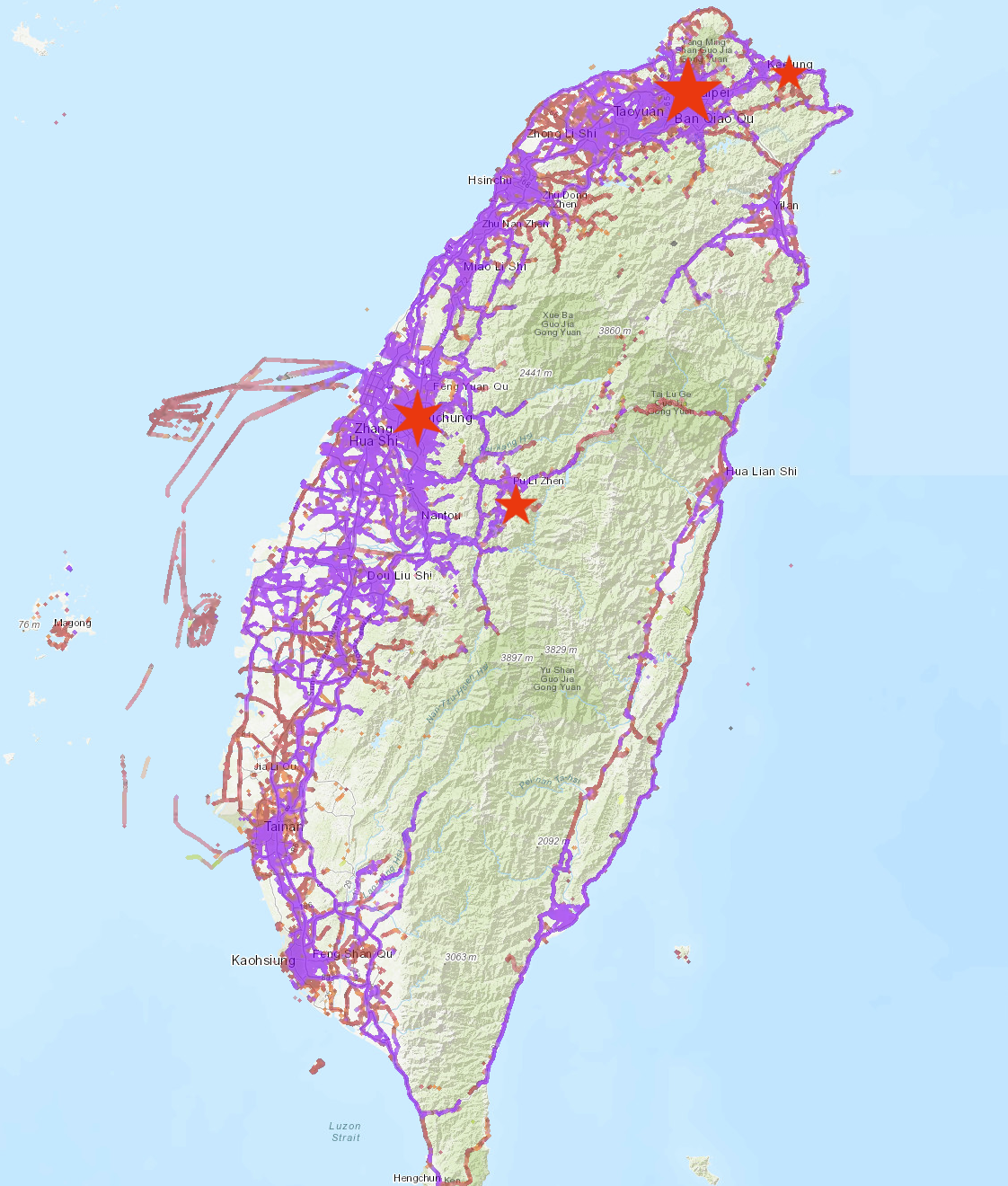
    Chunghwa telecom map of coverage in Taiwan.  The western side of the island is coveraged, the central area, not much, and another stretch along the eastern seaboard.

    Everything worked great for the first 2 and a half days in Taipei, but then we headed south into the central part of Taiwan. Holafly used Chunghwa telecom, and this image is Chunghwa’s network coverage. The stars represent where we spent time. Taipei is the capital of Taiwan and, with it’s environs, the largest city. As you would expect, coverage is excellent.

    Taichung is another major city, with excellent coverage, and, per the map, the entire space between the cities has excellent coverage. In fact the western seaboard contains the bulk of coverage.

    For a quick geography lesson on Taiwan: The western coastal plains are the best, most arable land. It’s flat and relatively easy going. it is were most of Taiwan’s population lives. The central mountains, are absolutely brutal, almost uninhabitable, and they plunge straight into the eastern coast. Still, some towns and cities cling to some of the better spots on the east, and there’s a nice rift valley that’s also inhabited. There are only three roads that can get you across the mountains. (There’s a fourth, but it really skits the mountains rather than crosses them.) I’ve traveled across all three. One is no fun. The second was the most frightening road I’ve ever been on. That is, until I was driven across the third, which is the kind of road that probably fills a lot of pants with shit. After that crossing, we all vowed to never travel on that road again. Two of them have been significantly damaged and closed (and, in cases, re-opened, re-closed, etc.) by earthquakes and typhoons. The bottom line is, there’s not much up there except beautiful scenery.

    The one place on the map towards the center of the island is Puli, and nearby Sun Moon Lake, which is in the mountains, but the area isn’t terrible for human habitation.

    Our cellular service was great until we got a ways up the highway to Sun Moon Lake. At the time, I was certain it was spotty coverage, but looking at the coverage map, the roads to Puli and Sun Moon Lake have solid coverage. The behavior was exactly like you’d expect on a moving bus moving in an out of cellular range. Signal-no signal-signal-no signal-signal-no signal, ad nauseam.

    But when we reached Sun Moon Lake, the problem didn’t go away. Yes, it wasn’t as frequent, perhaps just a few times per hour, but it clearly wasn’t because we were moving.

    And this is the way it stayed for the duration of the trip.

    What happened? I don’t know. I can only speculate. Did our problem begin because we were on the bus? Or was that a coincidence? Should we have rebooted our phones once we returned to Taipei? (I wish I’d thought of that at the time!)

    Did we both hit our high-speed data cap at around the same time, and the slow speed data was so pathetic as to be nonexistent at times? I don’t think it’s this one because it wasn’t just a case of the data being slow, the actual signal disappeared — no bars.

    Here’s my best guess: Network traffic shaping. Services like Holafly contract with a local carrier, in this case Chunghwa Telecom, to provide service. In much the same way that Mint Mobile in the US uses T-Mobile’s network. I don’t know what type of service guarantee their contract with Chungwha has, but you can bet that they’re second-class citizens compared to Chunghwa subscribers.

    [Content note: It’s now been months since I wrote the previous portion of this narrative, and it has languished in “Drafts” from that time, forgotten and unloved. I’m picking up the story here in probably much less detail because the details aren’t as fresh in my.]

    Above I stated that it remained this way for the “duration of the trip.” I don’t mean for the duration of the trip to Sun Moon Lake, it remained that way for the entire trip to Taiwan. What had been fantastic service when we started out, degraded into just useable to not-at-all-useable at times.

    It felt as if we had hit some barrier, and we were permanently second-class citizens.

    As we got to the last two or three days, I considered dumping the Holafly eSIM and grabbing one from Airalo or Saily to if the problem went away, but in the end, I opted to activating the data on my Verizon international roaming and pay $10/day for it.

    That worked great, once I remembered to switch the “primary” mobile data designation from Holafly to Verizon.

    Next trip, I’ll try a different eSIM provider, and go with shorter duration service and purchase multiple eSIMs to cover the trip – perhaps even alternating providers to compare them.

    …and, I’ll remember to use my Verizon data when necessary.

  • The Instacart Experience

    The Instacart Experience

    We completed our first Instacart transaction today, and it was satisfactory; however, there were a few things that we either had to hunt for or discovered in the process.  For the purposes of passing this on to others, here’s an account of our experience and what we learned.

    Let’s walk through the experience first.

    You’ll be presented with a group of stores that are in your area that Instacart will shop at.  On Instacart’s website they have the stores broken down in three pricing types:  

    • Stores that the Instacart price is the same as the in-store price,
    • those that the price is higher than in-store price and finally,
    • those that are mixed… some higher, some the same.

    The store we normally shop at, Safeway, had higher prices, so we chose to go with Fry’s Food and Drug, which had the same pricing model.

    The Online Shopping Experience
    The shopping app is easy enough to navigate, with pictures of the various items and pricing.  We chose about 30 items, with an approximate total of $140.  In some cases we would be told that an item was out of stock, or, more often, that the item was in low supply.  In which case, it would prompt us to select an alternative and would make a suggestion.  In the two or three instances, the suggestions were generally satisfactory.

    One case was a bit weird.  I chose a box of frozen crunchy taquitos.  It warned me it was low and suggested crunchy beef and cheese chimichangas from the same company as an alternative.

    This was a new product that I was not familiar with but sounded intriguing. I wanted to try them, instead, I chose the option of “don’t replace” for the taquitos and then proceeded to add the chimichangas to my purchase list as a separate item.  It immediately told me they were low on them and suggested the crunchy taquitos as an alternate.

    The circular logic of this was a little odd.  (For the record, in the end, we only managed to get one box of chimichangas and no taquitos.)

    When you complete your order you pay through the app and apply the tip for the shopper.  I’ll discuss pricing later.  They place a hold on your credit card for an amount greater than, but not unreasonably so, the amount of your order.  In our case, it was a $190 hold.

    Between the time you complete shopping and when the shopper is dispatched to the store, you have the option of adding or deleting items.  This was handy because we didn’t do the most organized job of shopping and added a couple extra items along the way.  Because the hold was larger, they did not require additional charges to add items.

    One of the options you can choose is to let the shopper leave your groceries at your front door without interacting with you, which I can’t see how that works, but since we knew we’d be home and we ordered ice cream, that just seemed a non-starter.

    Scheduling
    Things are weird right now.  Stores are running low on everyday items.  Delivery services are experiencing unprecedented demand.  I don’t think we can say that the Instacart schedule experience was typical.  It wasn’t bad, but it probably wasn’t typical.

    We placed our order late on Wednesday.  We were presented with two options, either a scheduled time slot, the earliest being Monday of the following week, or “whenever available”, which would be any time between Friday and Sunday of the current week.  As we were in no hurry, and home all day, but didn’t want to wait till the next week, we chose the as-available option.  We were told we would receive a notice when shopping began.

    Each day I checked the app to see what it had to say, each day the window for shopping shrank.  First Friday through Sunday, then Saturday through Sunday, and finally just Sunday.  At least it didn’t start adding days on the end.

    The Shopping Event
    8:00 AM Sunday morning I got a notice from Instacart that my shopper was starting shopping.  It is not uncommon for us to sleep in well past 8:00 AM on Sundays, but as it happens, I was awake.  This could have been a very different experience if we’d slept through it and left the shopper to their own devices.

    The notice included the name of the shopper and the ability to chat with them.  Soon thereafter I started getting notices that they had substituted items.  The first was perfectly reasonable.  The store brand of baby spinach was out, and so they substituted the name-brand equivalent.  No problem.  It appeared that this was “done deal” based on the notice I got; however, when I went into the app, I noticed that it gave me the option to approve or make an alternate request.  None needed, so I approved it.

    Next we had a box of standard cheddar goldfish crackers for my kids, and they were out, so the shopper substituted “Flavor-bast goldfish.”  Which I think is an improvement; however, for whatever strange reason, my kids won’t eat them.

    In this case, I did not approve the substitution, but instead recommended a smaller box of the standard goldfish.  I took this opportunity to use the chat and told the shopper why I rejected it.

    Once the shopper knew I was there and actively paying attention, we got a lot more interactive.  There were several other items that weren’t in stock, but now I would get a photo of the picked over shelves and asked “what would you like me to pick from what’s here?”

    This worked pretty well, although it was sometimes a bit difficult to tell what was on the shelf.  On some occasions he just listed the alternative.  For example, we wanted Mission Brand taco seasoning, and I just got a question that said, “they don’t have Mission, but they have Ortega or Pepe Sanchez brand which would you like?”

    I don’t know if their system favors sending the same shopper to the same account every time, but I could see how if you got a “regular” shopper, they would begin to know your preferences and get better at it.

    Even though we made a lot of the choices via chat, they always ended up in the app for me to approve, which was fine.

    He let me know when he was done shopping, and then a few minutes later he let me know that Fry’s didn’t have enough checkers working and the lines were long and that it would be a while.

    We had a couple jokes about everybody thinking Easter morning at 8:00AM would probably be empty and they all went shopping.

    The Fry’s is two miles from my house, and my groceries arrived in about 15 minutes from when he finished checking out, which is a little longer than I would expect, but I’m familiar with the drive to my house and he wasn’t.  It certainly wasn’t unreasonably long, and my ice cream was in a cold bag to keep it frozen.

    He thoughtfully brought the ice cream to the door first so we could get it into the freezer ASAP.  He, and an assistant, brought all the groceries to my doorstep, set them down outside, and with cheery wave through the screen door and six feet of social distancing that separated us and a hearty! “hi-yo, Silver away,” he was gone.

    Ok, he didn’t really say that, but I imagined it as he drove away.

    The Pricing
    There ain’t no such thing as a free lunch and that goes for grocery delivery, too.  Instacart offers two plans, one is a subscription service which eliminates the delivery fee.   Obviously, for a trial run, we didn’t opt for that option, instead paying the delivery fee, which is a remarkably cheap $3.99 – if you’ve ordered more than $35 worth of merchandise.  That’s what you’ll find on a casual look at the website.  In fact, it’s a price so cheap you have to ask, “how the hell is this a viable business model?”

    Dig a bit deeper and you discover that Instacart charges a 5% service charge, which, on our order worked out to about $6, plus the $3.99 and it was $10 total.

    But it doesn’t stop there, and here’s an area that I really want some clarification on.  Does the shopper get any of that?  Instacart also charges a tip, which is technically optional, but morally not.  The default amount is also 5%, but we bumped it to an even $10.  Instacart is quick to point out that 100% of the tip goes to the shopper, but is that all they get?

    A little weird is that you pick the tip before it’s even been assigned to a shopper.  In fact, there are rumors that the shoppers pick and chose which jobs to take first on based on the tip.  There are further rumors that buyers sometimes put a big tip to lure rapid service, then change it afterwards (which you are allowed to do) to a lower amount.  The flaw in that system is apparent.

    I tested the “change tip” system and bumped my shopper a couple more bucks along with a five-star rating.

    Is There Even More Cost?
    Yes.  Yes, there is.

    One of the “options” presented on your account is to attach store loyalty cards.  We have loyalty card for both the store we normally shop, Safeway, and for the backup store that we used for this Instacart experiment, Fry’s.

    You can save quite a bit of money using loyalty cards, but unfortunately, neither Safeway nor Fry’s were included.  (It does say that more stores are coming soon.)

    This was not a deal-breaker, but disappointing.  It certainly means that without the loyalty cards, we would be inclined to not use Instacart on a regular basis until they implement.

    I have my doubts they ever will.

    Along with our groceries, we also got the actual store receipt.  This allowed me to compare what we were charged by Instacart and what they paid in the store.  They don’t match, but I was able to reconcile it, and, of course, the difference is in Instacart’s favor.

    The prices quoted on their site, and charged, are the listed store prices, so, to be clear: I paid what I was quoted and expected to pay, so I am making no assertion that a “fast one” was pulled.

    Instacart has their own loyalty savings card which was used on the transaction.  This resulted in a  VIP shopper savings to them of $3.81, which they pocket.  It doesn’t sound like much, but remember my 5% service fee was only around $6.  This is like paying for another 2-3% in addition to the service fee.

    Chump change, right?  Not to Instacart it isn’t.

    At the bottom of the receipt, Fry’s thoughtfully provides the year-to-date savings for that loyalty card.  The bottom of my receipt proudly says, “Annual Card Savings $681,736.25.”

    It’s mid-April.  That’s a 3.5 month take, representing an average of over $6,600/day, for just one supermarket chain in their network.

    And who knows how regional that is?  Fry’s is a Kroger store.  Does that tally include other Kroger brand supermarkets or just Fry’s?  Is it regional or nationwide?

    Having that kind of money coming in on the margins is why I doubt they’ll ever implement loyalty cards.  It’s a dead loss for them to do so.

    Let me posit that this is an area ripe for abuse, too.  For example, citing my spinach example above.  I asked for the cheapest spinach because… it’s spinach, and it has no place in the home or kitchen whatsoever.  That notwithstanding, my family wanted spinach.  Fine.  But I’m not spending money on “premium” spinach if I don’t have to.  The item I selected was $1.99, but they were sold out, and the replacement cost $2.29.

    Now, this didn’t happen, but what if the replacement had a VIP loyalty card savings of $0.30?  Could a situation arise where the shopper, realizing a more expensive alternative would net more back to Instacart might base their on-the-spot decisions to Instacart’s advantage?  Would there be any incentive for them to do so?  Could that include perhaps “overlooking” and item in stock in favor of an alternative?

    I was active and participating in the shopping, but it’s clear that the shoppers have some autonomy to use their discretion if you are not available when they’re shopping.

    There is absolutely no whiff of anything like this happening in my dealings with Instacart, but like the rumored tip juggling I mentioned before, humans will find a way to game a system to their advantage if they can.

    Finally, and this is just the most minor of things…. We bought two carrots and the prices just don’t match.  Instacart charged us for 0.5 lbs. of carrots but the receipts says 0.45 lbs. of carrots, for a net discrepancy of $0.05.

    At a guess, I’d say that Instacart rounds up to the nearest half pound.  That feels a bit like those clever (yet dishonest and misguided) programmers that once figured out that they calculate interest earned on savings accounts and funneled the truncation error into a separate account and accumulated a fortune.

    Conclusion
    All in all, it’s a handy service and the process worked well.  The final breakdown on pricing was:

    • $118.26 groceries (per store receipt)
    • Delivery fee: $3.99
    • Service Fee: $6.10
    • Tip: $12.21
    • Carrot scandal: $0.05
    • Loyalty Savings Lost: $3.81

    Total of fees/tips/charges:  $26.16
    Fees as percentage of total grocery purchase: 22.1%

    22% does seem just a bit much for it to ever be our go-to option for grocery shopping.

  • Vlogging iMovie on the iPad 2

    Recently I posted my thoughts on iMovie on the iPad 2. I an exercise of complete redundancy, here’s are those same thoughts (more or less) in video form.

  • iPad 2 Thoughts

    Another in my wacky series of vlogs, this time discussing the iPad 2. Edited entirely on the iPad 2.

  • Logitech Harmony 700 Remote – Review

    This time I’m looking at my new Logitech Harmony 700 Universal Remote.

  • Primeval – S04E02 – Review

    I got nothing.

    The current series of Primeval is so ordinary that I have neither strong positive or negative feelings towards it. They aren’t screwing things up badly like they did last season, neither are they making me interested like they did in the first season. I’ve watched through this episode 3 times and still I’ve got nothing, so I decided to try my Fusion Patrol approach. I watch the show, take notes, fill in some comments and hope I have something to say.

    Timeline/Notes

    00:00 Five years ago a woman captures a bizarre baby anomaly animal and flushes it down the toilet. Yeah. I’m believing that. Looked too big to flush. Perhaps some kids would like to try some experimenting and report back to me on that one. What is the maximum size lizard you can flush. My guess is you’ll need to live in Australia or Indonesia to try that one.

    00:04 Philip, “We’re poised on a new dawn” – hhhmmmmmmmm, New Dawn, that sounds fishy. What kind of scientific advancement is he hoping to get? Is it just an understanding of time, or is he perhaps trying to control time?

    00:05 Danny Quinn still has a locker. They just keep reminding us about the missing Danny. Once again that seems to indicate Danny isn’t really gone yet.

    00:06 Lot of old dumpy buildings in London, aren’t there? Actually, this looks like the same building they shot in during the second series.

    00:07 Perky chick (what’s her name?) gives Conner the key to her apartment. Suspicious? Forward? Clueless? Not sure which. Isn’t she perky, though?

    00:09 Rex is back. I hope he doesn’t feature in any more episodes. He’s such a technically stupid creature, that thing certainly couldn’t flap his wings and fly.

    00:09 New guy (What’s his name?) is chatting with old guy (Is that an old Danny?) Clearly New Guy is spying for him.

    00:10 We have our first fatality! Construction worker for dinner! It took 10 minutes for a fatality… this show is really slowing down.

    00:11 Perky Girl’s apartment is nice. ARC must pay well well. At least she uses Macs.

    00:14 Conner’s old friend, Duncan, has really moved up in the world, living rough and homeless and he has a collection of dinosaur poo! Nah, he’s not obsessing about the whole “best friend killed by dodo” thing at all.

    00:20 Perky Girl has the hots for Becker!

    00:21 “Are you (Abby) his (Connor’s) girlfriend?” “Wow, there’s hope for us all!” Best line in the entire series, although, I’m noticing that Abby is aging pretty fast, she’s never going to age well like Claudia Brown/Jenny Lewis. PLEASE bring Jenny back! At least we have Perky Girl.

    00:24 It’s a Boar Croc (Kaprosuchus)

    00:26 Abby has commandeered a boat. On what authority can she commandeer a boat? Do they carry ID?

    00:27 Only the second killing. Not much of a body count. Ho hum

    00:29 Becker to the rescue! Ever notice how the ARC has a team of crack military types, but none of them do anything except Becker?

    00:30 Container breaks free with creature inside, falls 30+ feet… and the animal is still alive. Rubbish! Do we have to discuss the cube/square law?

    00:32 I’m so glad the guys running this container port have stacked the containers in a convenient labyrinth pattern.

    00:34 One utterly useless ARC soldier dead! Body count: 3

    00:37 Conner has his job back! Was it ever in doubt? Wonder why they bothered with that subplot? Was it just to kill time?

    00:39 Becker might have the hots for Perky Girl… and why not?

    00:43 …and it’s all over. 43 minutes? That’s short!

  • Primeval – S04E01 – Review

    All this tweeting and podcasting and suddenly I just don’t have time to review new science fictions shows – or, if I do, I do it on the podcast. That just doesn’t seem right, and one of the staples of my blog has always been reviewing episodes of Primeval. Pity they cancelled it, isn’t it?

    Ah, but they didn’t, nearly two years later, Primeval is back. Is it better than before?

    For those perhaps not in the loop, Primeval, an ITV science fiction program about temporal anomalies opening corridors between different times and the present, often allowing nasties such as dinosaurs into our own time, ran for 3 successful – if dubiously plotted and scientifically inaccurate – seasons, but, the global economic crisis combined with ITV financial difficulties lead to cost-cutting measures. Primeval, a CGI-heavy series, had to go, but creative financing has brought the show back to our screens. (Well, back to some people’s screens, anyway.)

    Synopsis

    At the end of the previous series, Danny Quinn, team leader at the Anomaly Research Center (the ARC) was trapped, perhaps forever, in the Pleistocene, having defeated Helen Cutter’s evil plans to destroy mankind. Helen had been killed by a velociraptor that had followed them through the anomaly and Quinn was cut off.

    Meanwhile, Abby and Conner had been trapped in the Cretaceous, also with little hope of an anomaly opening on its own.

    One year later, with a Spinosaur on their trail, Conner and Abby find Helen Cutter’s anomaly control device and manage to return to the present day, brining a Spinosaur with them. They find themselves face-to-face with the new ARC team and must all work together to stop the Spinosaur.

    Analysis

    Typically the analysis section of these reviews is where I rip the piss-poor science and ridiculous temporal-plotting, but this episode is something new… there’s really nothing in it. It’s a straight-forward melodrama with no twists or turns and, once past the notion of the anomalies and creatures traveling through time there’s nothing in that to pick on, either.

    There are a couple things to note, first, the ARC has been turned into a “public/private partnership” and new character, Philip, Nobel-prize winning genius and inventor of the room-temperature super-conductor now seems to co-own the ARC, and is clearly in a superior position – if equal on paper – with Ben Miller’s returning character of Lester.

    Of the old crew, only Becker survived in the present, and he’s been made second-in-command to a new Irish guy who is so non-descript I have to wait for someone to call him by name before I can remember what it is. (OK, I just looked it up, his name is Matt.)

    Matt has a secret, he seems to be collaborating with an elderly gentlemen and, if their remarks are to be believed, they’re working together to save the world, and Matt is searching for someone at the ARC.

    My pet theory is that the old man is actually Danny Quinn, returned via anomaly to some point in the past and having lived his entire life waiting for this time. I’ve got nothing to support that; however, in the “summary” at the beginning of the episode, we saw the actors faces of Conner, Abby, even dead characters like Cutter and Helen, but we only ever saw the back of Danny Quinn’s head or a quick shot where his face was obscured. If the character has been written out of the show, why would they hide his face and not the others?

    Considering it was such a long time coming, I’ve not got much to say about it.

  • Garmin 1490T GPS goes to DisneyLand

    A couple months ago, I purchased a Garmin 1490T GPS at Costco. Although I’ve wanted a car GPS for some time, but couldn’t justify it just for driving around Phoenix. The pending trip to DisneyLand, smack in the middle of the freeway hell that is the Los Angeles metropolitan area, was ample justification. While I’ve had the unit and have gotten very familiar with its operation, I didn’t want to review it until it had its trial by fire.

    I’m pleased to report that the unit came through with flying colors, in fact, it exceeded my expectations at every level. There was only one instance when I took a wrong turn and, to be honest, it was entirely my own fault. I made an assumption that the GPS was wrong and… it turns out I was wrong and it was right. We’ll say no more about that.

    The 1490T has a large touchscreen interface, but unlike the iPhone’s glass screen, the 1490T has a soft plastic screen, which isn’t very responsive compared to the iPhone. I found myself having to push extra times on the screen, particularly when entering text. Apart from that, the interface is logical and easy to navigate.

    The unit comes equipped with the ability to speak street names, and has several “voices” it can use. I’ve chosen to use the female “British” voice, but there are both male and female voices in American, British and Australian accents. The accents aren’t particularly strong, but it was initially confusing by the British voice’s insistent to call on-ramps and off-ramps “slip roads”. It’s a term I’ve never heard.

    The GPS can also use a variety of voices in other languages, as well as ones you create and load yourself; however, these voice give only generic instructions such as “turn right” instead of speaking the street names, as in “turn right on N Beaver Rd.”

    In particular, the feature that turned out to be the most helpful was the “free” traffic updates. These updates are supplied by FM radio in major metropolitan areas and are ad-sponsored, and so periodically, ads for Red Lobster pop up (discretely) on the screen. The GPS takes your current route and compares it to the traffic database and arrives at a delay estimate, which is displayed on the screen. The GPS compares your current route, including traffic delays, against other routes to the same destination. If an alternate route is determined to be faster the GPS changes your route to avoid the problem.

    I’d tested this a number of times in Phoenix and it was less than impressive. The unit would show me that there was a delay of several minutes, but would not re-route me. You can have it show you where the traffic problems are and even “force” it to avoid the traffic; however, in every instance it would complain it me, telling me this really was the best route and even if I told it to avoid anyway, it didn’t seem to do so.

    If you know anything about the route from Phoenix to Los Angeles, you’ll know there aren’t any practical alternatives to Interstate I-10. Once you’ve gotten a certain distance outside of Phoenix (around 400th Ave), I-10 is the only choice for crossing the vast wasteland in any kind of direct route. Other alternatives take you hundreds of miles out of the way.

    As we left town on I-10, at around 130th Ave, the traffic delay indicator started to go crazy. FIrst it read 10 minutes delay, then 20, 30, 45 and finally 53 minutes before it announced it was recalculating due to severe traffic. It then routed us along a series of byways as we got progressively farther out into the middle of nowhere and it finally returned us to I-10 at 339th Ave, at which point we could see there was a major construction project and that traffic was backed up in both directions as far as the eye could see.

    There was a second couple traveling in a different car about an hour behind us. They chose not to heed my warning and spent two hours stuck in the jam. For this event alone, the Garmin 1490T GPS has won a permanent place in my car on road trips.

    I recommend this GPS.

  • Flip Mino HD vs Kodak Zi8 and Apple iPad, iPhoto and iMovie

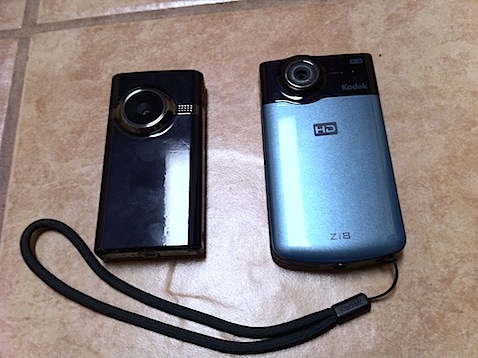
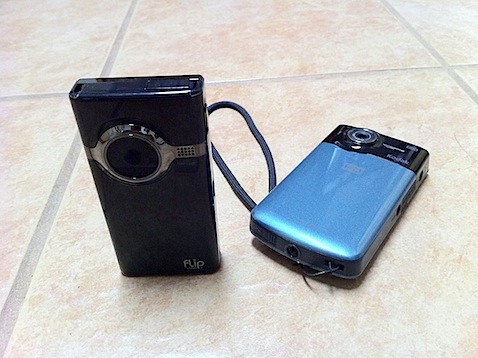
    Recently in conversation, the topic of using the Flip HD and the Kodak Zi8 mini-camcorders came up, and specifically, how well do they work with Apple products, like iMovie. As it happens, I own both the Flip and the Kodak camera, so I put down a few thoughts on them. For anyone who might find this comparison helpful, here then in a slightly edited and revised version of those thoughts.

    Comparison Flip Mino HD and Kodak Zi8

    I’ll start by saying that, as a camera, I prefer the Zi8 in virtually every way to the Flip HD with the exception of the shape of the bottom of its case, which is, I admit, a rather trivial – but valid – complaint.

    As far as I can see, picture quality, macro ability, picture format options (30 or 60 fps, for example), SDHC card compatibility, spare battery capable, low-light ability… in every way, the Zi8 surpasses the Flip. It’s my “go to” HD camera – although I use my iPhone 4 often because it is always with me; however, as a camera, the iPhone 4 is still pretty limited.

    My complaint about the “bottom” of the Zi8 is simply this: It’s rounded. Both have tripod sockets, but with the Flip, the flat bottom means you can, in a pinch, stand the camera on a table. The Zi8’s round bottom makes that virtually impossible, making a tripod mount absolutely necessary.

    So, as a camera, the Zi8 is my preference, but if the question is: Which camera works best with a Mac (or, perhaps I should say, “Apple products” then I’d have to say that the Flip is somewhat more compatible.

    One falls over, the other doesn't

    iPad

    First, let’s look how it works with the iPad.

    I’m starting with the iPad because it is probably the most inflexible environment to use the camera with and supports a narrow range of formats as opposed to the Mac.

    If you want to use a camera of any kind with the iPad, you must have the iPad Camera Connection Kit, which is a pair of dongles for the iPad. One is a USB dongle, which allows you to connect a standard USB cable to the iPad and then connect that to a camera, just as you might connect your camera to your computer. The other is an SD card reader, for plugging SD cards directly into your iPad. (These dongles can only be used to get stuff onto your iPad, not back off of it.)

    Both the Flip and the Zi8 have built-in USB connectors so that they may be plugged into a computer without having to carry a cable. This is a great feature, but a little awkward depending on what other USB devices you have and the configuration of your computer. The Zi8’s is flexible and allows slightly greater freedom in connecting the camera to a computer. The Flip’s is fixed and I always have to disconnect all other USB devices from my MacBook Pro before I connect it. You could, of course, use an extension cable, but that defeats the purpose of having the connector built-in.

    Using the camera connection kit USB Connector the Flip connects and the videos can be imported directly into the iPad. Under the same circumstances, the Zi8 causes the iPad to complain that it needs “too much current” and it will not recognize the device. Score one point for the Flip.

    Using the camera connection kit SD Card Connector the Flip cannot connect because it doesn’t use SD cards. The Zi8’s cards are easily read and imported. Score one for the Zi8.

    I’m going to make a note here that under each camera’s appropriate connection method, you can see thumbnails of the videos. That’s good because you sometimes don’t want to import every picture or video and you need to see a thumbnail to decide which ones to import.

    However, once the videos have been imported into the iPad… you can no longer see the Zi8’s thumbnails… you get a generic icon that says “movie”. The Flip ones have thumbnails and can be watched on the iPad. You cannot see a thumbnail or play the Zi8 video on the iPad. That’s 2 points (thumbnail and playable video) for the Flip and non for the Zi8.

    So, if you’re using the Flip with the iPad exclusively, I’d clearly recommend the Flip as the superior camera in terms of usability with the computer equipment. This is especially likely to be important if Apple ever releases iMovie for the iPad. Flip videos may be immediately editable. Zi8 videos almost certainly will not.

    The Mac and iMovie

    Let’s ignore everything I said about the iPad now and concentrate solely on the Mac. In this instances, I am referring to the iLife ’11 series of software. I was using them on older versions, but I’ll confine my remarks solely to the current version.

    If you plug either camera in, iPhoto sees them as cameras and will import and play the videos. No problem and this is how I use both cameras, importing the videos directly into iPhoto ands then using them in iMovie from within iPhoto. They both work fine.

    The Flip comes with some nasty video management software which is, at least, fully Mac compatible. I don’t like this software, but it does work. It is not necessary and can be ignored. On the other hand, this software also does the firmware updates to the Flip, so ignore it at your peril. There have been several updates since I bought the Flip. I do like the fact that the Flip has a planned mechanism for updating their firmware.

    The Zi8 has none of that, and, as far as I can tell, no firmware updates since I bought it, nor does there seem to be a user-friendly way to do the updates when they do happen.

    However, iMovie also has the capability to import directly from the camera, selecting only the clips you need, if you prefer to work that way. iMovie recognizes the Flip as a camera, it does not recognize the Zi8 as a camera. You have to get your Zi8 videos in from iPhoto or direct file import. Score one for Flip.

    Otherwise, all things are about equal.

    Conclusion

    So… if I and my iPad were on the road without computer, and I need to view my videos, the Flip would be the better way to go.

    On the Mac, since I use iPhoto to organize my videos anyway, this isn’t an issue and I use the same workflow for both cameras, therefore I prefer the better and more flexible Zi8 as a camera.

  • A Bad Day in Phoenix is a Good Day to Test the iPhone

    Friday was a state furlough day. While the school were still operating, the entire machinery of the state of Arizona was closed (and unpaid, of course, that was the whole point.) With nothing to do and no family around, I was going to attend to miscellaneous tasks around the house – until the air conditioning died late Thursday night. Summer is running long this year and it’s still well over 100 every day. Air conditioning repair companies are swamped and it’s nearly impossible to get a good technician to look at a dodgy unit on short notice. We have a reliable company that we use and they were able to get someone out towards the end of the day Friday.

    The practical upstart of the whole situation is that I needed to abandon the house for the entire day and could not retreat to the office.

    I decided I was going to try two things:

    • First, make a movie with the iPhone and the iPhone version of iMovie. I had tried this on the day I got the phone, but made a horrible mess of it. I was unable to cut and assemble the scenes as needed and learned I needed to adjust my shooting style, and
    • Go to as many Apple Stores as necessary to get an iPad Camera Connection Kit, which is never in stock. I figured I’d probably have to go to all of them and still not get one. Of course, I could have called, but how would that kill an entire day?

    With nothing more than that in mind, I headed off on my trek.

    I did vaguely attempt to make a few different types of shots, such as close-ups, using both the front and back camera, using the video light, moving shots, walking talking shots, etc. From my first attempt I also knew not to cut the shots too close. You want plenty of pre-roll and post-roll footage, as I didn’t have much luck with frame accurate editing.

    After spending the day taking a series of mostly extemporaneous shots as the mood hit me, I came back home – and while suffering still without A/C, I set about editing it with the iPhone iMovie app.

    A lot of people have remarked how wonderful it is, but to me, it’s extremely restrictive and difficult, suitable for 5 or 6 shot, “cuts only” editing. Trying to string together 15-20 shots from a collection of 25-30 is tough. Let’s start with the work flow. Let’s assume we’ve already shot the footage and it is (obviously) on the phone.

    You start by creating a project. Currently there are four themes and you cannot choose “none” although if you don’t use any theme elements, you essentially have chosen none. You cannot combine elements from one theme with elements from another (exception: the music) As far as I can tell the theme dictates only three things – the titles, the transitions and the music.

    Once you have a new project, you can start dropping things in. Select new video media and your library of video is shown, as film strips, in reverse order. If you’ve shot your program linearly as I did, you scroll to the bottom, find your clip and tap it – it’s tossed into the project at the end of the clip that’s currently on the “playhead”. Note: it doesn’t place the clip AT the playhead, it skips to the end of that clip and places the new clip. There is no insert/overwrite editing.

    There is no way to inspect the clip in the bin before placing it, and there’s no information, not even the name, provided, meaning you have to guess what clip you want based on the opening frames. In “Bad Day in Phoenix” I shot mostly in order and deleted outtakes before editing. if it had been many shots with similar locations, a slate would have been essential. Just the ability to preview the clip before inserting it would be very helpful.

    Clips are automatically placed with a .5 second crossfade. You can double click the transition placed between the clips and change the duration or change to a simple cut or the “theme’s” transition.

    Trimming the clip is achieved by taping the clip once, then grabbing the pin at either end and sliding in or out. It’s not very precise and doesn’t play audio so it’s hard to line up shots. I found it difficult to trim the shots the way I wanted.

    The program is not without bugs, too. Sometimes clips wouldn’t play their audio. On the next pass they would. Since everything was shot on the phone, it shouldn’t be an incompatibility with the clips. Nonetheless, one clip never played audio and didn’t even render with audio and I had to delete it from the movie. The clip plays just fine, with audio, in the phone’s photo application.

    Titles are placed over a single clip, and seem to run the entire duration of the clip (minus transitions). You have three kinds, opening, middle and closing. Essentially opening and closing are title cards and middle is roughly a lower third. You cannot position them to start at any location than the start of a clip. Nor can I find any way to “split” a clip that’s in the timeline (this would allow you to trick the title to appear on just the segment of the clip you wanted and would also be handy for attempting to simulate an insert edit.)

    Considering the type camera, and the prominence it was given in iMovie HD for the Mac, I’m surprised you do a simple 90 degree rotation of a clip. It’s fairly common that people using digital cameras to record video forget that it’s landscape only and shoot in portrait mode. iMovie HD “fixes” that easily. iPhone iMovie does not. I made that mistake twice while shooting this movie, luckily, you might think it was as artistic choice. It wasn’t.

    The clips audio can be turned on an off. There is no way to adjust the volume so you cannot normalize the audio between one clip and the next.

    You can law down some audio, which can be either any of the themes’ music selections or anything from your iPod. You cannot place the music where you want it, it simply starts at the beginning of the project and moves towards the end.

    You also cannot insert audio from you voice note recorder and so cannot record narration and lay it down over the video, nor can you overlay audio from another movie clip. This means I had to narrate each shot as it was recorded, which is a very inflexible and inelegant solution.

    Rendering the video was also a problem. The 15 minute video is 1.2GB, the various clips used to make the video were closer to 2GB. With 6 GB free on the phone, I was unable to render the video. My phone ran out of space. I had to change my sync options and put far less of my music collection on the phone to get enough room to process the video.

    The quality of most of the video was really good and I have no complaints about the finished output (no complaints that couldn’t be explained by the lack of choices in the editing and shooting process.) For short, quick features, iPhone iMovie can produce a remarkably polished, but it is not suitable for much more. You can do much, much better by loading the footage into iMovie on a Mac and editing it there. You can’t do that in the field, though.

    Next, I might try editing it on the iPad.

    Oh, and here’s the movie:

    Bad Day in Phoenix from Lone Locust Productions on Vimeo.

    What to do when it’s 109Âş outside, you’re off work for the day with nothing to do and you air conditioning goes out at home and won’t be fixed until the evening?

    That was my dilemma today. See how the Apple Store solved my problem of what to do!

    This video was shot, edited and rendered entirely on an iPhone 4 using iMovie. My intent was nothing more than experiment with the onboard features to see how robust they were.