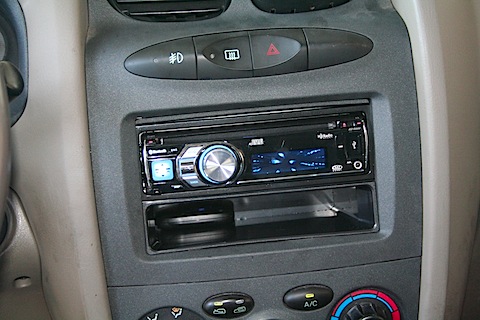
 It’s been a few days since I had this new JVC stereo unit installed, and I’ve now taken several “trips” with it, plus I’ve tried to test out all the features I’m likely to ever use.
Background
I love music. I listen to lots of music – eclectic music, perhaps, but I’m never far from my music. I’ve always required that I be able to take the music I want to listen to in my car. If that meant making my own cassette tapes, or CDs or whatever, I’ve always found a way to get my music in my car.
To me, the iPod is a revolution. The idea of “all of your music in your pocket” is enormously compelling to me. Since I got my first iPod, iPod integration into my stereo system has been high on my wish list. These days, though, new stereo equipment isn’t high on the “have I got money to spend” list, so I’ve had to make do in my current vehicle with the factory stereo.
First I tried those cassette adaptors. Wow, do they suck, especially since everybody’s tape decks are auto-reverse these days. Even the ones supposedly built for auto-reverse decks soon break and start madly switching back and forth.
I tried FM transmitters. Wow, do they suck, especially in Phoenix where every space on the dial has a station or interference from a station. (And why is it every time I come within 30 feet of a city bus the station is drowned out in static?)
The holy grail of iPod integration for me would be a directly connected wire from the iPod’s dock connector to the stereo – you know, like Steve Jobs announced being built into all BMWs, years ago. Of course, stereo manufacturers started making these types of systems, and I was about to buy one when fate threw me a curveball: I got an iPhone.
The iPhone, while sharing the same dock connector, isn’t quite the same, and all the stereos on the market that worked fine for an iPod would not work for an iPhone.
I was back to square one – except that FM transmitters are even flakier on an iPhone due to the radio transmitter in the phone.
And so I waited. I waited and I periodically looked online for reviews of “iPhone compatible” car stereos. Finally, a couple weeks ago, things turned promising and I found a unit I was prepared to gamble on. I purchased a JVC KD-R800 via Amazon.com for $149.
Review
Here are the features that I consider meaningful on the unit.
It has two USB ports, one front and one in the back which can be snaked over into the glove box. You can plug in a USB key, USB HDD or MP3 player of that ilk and it will play the MP3s and WMAs. Most importantly those two ports (and the unit itself) are branded with the official “Made for iPod” and “Works with iPhone” monikers from Apple.
The unit has an auxiliary in port on the front which every stereo on the planet ought to have. That said, I have no use for it because of the USB ports, but it seems like a reasonable feature to have as a fallback should I ever wish to hook up some other varied and sundry device.
It plays CDs and, in keeping with virtually every any modern stereo, it plays MP3 CDs. I still have some of both, although virtually everything I have is on my iPhone, but you never can tell what might come along.
Finally, the last feature of some note is the Bluetooth connectivity. The unit is both a hands-free phone kit (and has a mountable microphone) and can play music streamed over bluetooth. Both of which are supported by my iPhone 3GS. I’m not too keen on the Bluetooth connectivity, as I’ll explain, but again, it does present a reasonable alternative and certainly should be a selling point of the stereo.
The reason I’m not really keen on the Bluetooth is two-fold. First, it is two different things, the phone and the music streaming. The phone part isn’t very useful to me because, in the last 8 or so years since I’ve owned a mobile phone, I have received perhaps 5 calls which I was driving, and I never call anyone while I’m driving. That’s not because I’m one of those “you shouldn’t use a cell phone while you’re driving” people (although I am), it’s because, in most months, my phone usage can be measured on double-digit minutes – and often I barely reach double-digits. I don’t talk on the phone, therefore the Bluetooth phone connectivity is not likely to get a workout from me.
The music streaming, while, I suppose might be nifty-keen, has no interest at all to me. Since I don’t gab on the phone, I don’t use my phone in the car. I don’t send text messages or e-mails, although once in a while I do use the Google Maps. I’d much rather have the phone sitting in the glovebox – being charged – sending music to the stereo over the wire than hanging on my hip or sitting in the front seat streaming music wirelessly and running the battery down.
In short, Bluetooth is not a make or break feature for me. Plug iPhone in and play music is the make or break feature for me.
(I should note that this unit also plays FM and AM radio stations and has optional “modules” you can buy to add both satellite radio and/or HD radio, but I hope to never listen to another radio station again now that I have iPod/iPhone connectivity.)
My first “surprise” out of the box was that this “Bluetooth stereo” doesn’t actually have built-in Bluetooth. It has a supplied Bluetooth module that plugs into one of the two USB ports. It would appear that Bluetooth is not legal in all jurisdictions that this unit is marketed in and so it is not part of the actual unit. That’s bad because if I use it, I loose a USB port. Do I need two USB ports? That is the question.
Let’s go over the various functions:
USB iPhone connection.
Works great, sounds good, zero configuration. I plugged it in and my iPhone started playing music immediately.
The current track playing shows on the display, (but not the album or artists, as far as I can tell) and it does not support Japanese or Chinese character sets. (I have a significant number of songs with titles in foreign languages, which the iPhone itself has no problem with.)
The iPhone can be controlled by the wheel on the front of the unit and it’s much like a standard iPod “click wheel” operation. The top level gives you things like “Playlists,” “Genres,” “Artists,” “Podcasts,” etc, and each push of the wheel selects a lower level. There is no support for videos or the new Genius Mixes.
Everything worked great if I plugged it in to either the front or back USB port. Up to this point it was 100% problem-free. (Cue ominous music.)
FM radio
It works. There are no preset buttons, but there are presets. You have to access them via click-wheel menu, which is not the most convenient system, but I rarely have more than 2 or 3 stations programmed in. Making up (perhaps) for the lack of physical buttons, you seem to be able to store an awful lot of presets, although I haven’t counted how many.
Bluetooth
After everything important was working, I concentrated on the Bluetooth. I very nearly didn’t install it, but since the install place (Arizona Sound) did such a nice job of installing the microphone up near the sun visor, I felt I had to at least try it out.
Pairing the Bluetooth was simple. I input a security code on the unit, turned on Bluetooth on my phone and the units paired right up. On the stereo the iPhone appears as two devices – one phone, one audio.
I was immediately able to place a call from the unit, and I found my contacts waiting for me on the menus. Still, it’s a bit difficult to scroll through the whole list 3 names at a time and I’ve since learned that you can select (on the iPhone) which contacts to share over the Bluetooth, so I’ll be making a small group of people I’m likely to ever want to call.
I was not immediately able to receive a call. The phone chirped away in the glovebox, and no display came up or other indication came from the stereo. Nor could I press the “phone” button to answer it. I have no idea why this happened, because the next time I started the car, it worked fine.
Call quality was good. People had no trouble hearing me over the sound of the car, and they came through the car speakers crystal clear – or at least as crystal clear as you ever get on an AT&T iPhone. (Yes, that’s a dig at AT&T.)
Bluetooth audio. Initially, I couldn’t think of a reason to try it, so I didn’t. More on that later.
Problems?
After getting the Bluetooth working, we drove across town for dinner, listening to music from the phone. It was delightful. Even though the underlying equipment (speakers, etc) are all the original factory equipment, this new stereo sounds better. There’s better definition in the stereo separation and I’m hearing more subtle details in the music. In short, It worked perfectly.
Until we headed back home after dinner.
I plugged the iPhone in and the music picked up right where it left off. I began to back out of the parking spot and got half out and the music stopped. It wasn’t paused as the display continued to mark the elapsed time and display the current song, but there was no sound.
I unplugged the iPhone and plugged it back in and it picked up immediately again, but with no sound.
I turned the unit off and repeated the procedure. This time the music came back, but only for about 20 seconds.
I dinked around with it with various combinations of plugging and unplugging, turning the stereo off, turning the car off and finally, with no discernible pattern, it worked and didn’t kick off. We drove back across town (about 30 minutes) without a hitch. Strange.
Frankly, I was not happy.
I did some online searching, but found nothing. Then an idea hit me. What if this is something to do with the Bluetooth audio streaming?
I took the phone out, hooked it up, started the car and, sure enough, the problem was back. Twenty seconds of music and it went quiet. Unplugging and replugging the phone made no different, so I turned the Bluetooth off on the phone and presto my sound came back. So now the question was, “Was it a problem with the stereo or the iPhone?” iPhones have notoriously poor Bluetooth support, so I couldn’t rule that out.
Unfortunately, there’s not much in the iPhone’s Bluetooth configuration for the JVC device, and, perhaps significantly, the JVC unit appears as one device.
I checked the Bluetooth settings on the stereo, and it shows the iPhone as two devices. I deleted the audio pairing, turned the iPhone’s Bluetooth back on and everything seemed to work fine.
On my next trip, the sound stopped again, and when I checked the Bluetooth settings, the audio Bluetooth device was back.
After much fiddling, I’ve stumbled across a provisional hypothesis as to what’s happening and how to circumvent it. It’s worked so far, but it remains to be seen if it proves true.
My hypothesis is that, when I turn on the stereo, it and the phone have to connect. If I plug in the dock connector before the devices have paired up, audio gets sucked away from the USB connection once the pairing is made. To see if that hypothesis is correct, I now start my car and make sure that the iPhone’s Bluetooth indicator has connected before I connect the USB cable.
So far it’s worked.
…and with that, and if it keeps working that way, I’m happy as a clam with this new unit.
Update 9/30/2009 I finally decided to try using the Bluetooth audio streaming capabilities of the unit, just to see what it was like.
Since I’m not really interested in the Bluetooth streaming, I only fiddled with it for a few minutes but the quality of the streaming audio left a lot to be desired. The sound kept dropping out as if the streaming buffer were overrun.
I’ll be sticking with the USB audio.